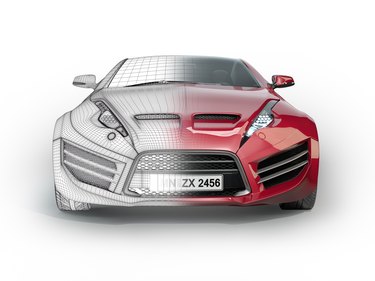
Although you can't convert a 2-D Photoshop image into a true 3-D wireframe, you can use filters to achieve a similar look. Using filters is less time consuming than creating the lines by hand using the Pen tool. The results depend on the complexity and lines of the original Photoshop image and how aggressively you apply the filters. For the best results, use an image that has a complex design, as simple shapes have fewer lines for Photoshop to extract. A blank background or one with a uniform color also yields better results.
Step 1
Open an image in Photoshop and press "Ctrl-J" to create a duplicate layer of the original image. Working with a duplicate layer allows for destructive changes to the image without affecting the original layer.
Video of the Day
Step 2
Select "Filter" from the menu bar and then click "Blur." Select "Gaussian Blur" and drag the slider to the right to increase the amount of blur. The goal is to decrease the amount of detail in the image to use only the most important lines for the wireframe. Use your own judgment when selecting the amount of blur, as the optimal value differs depending on the image; however, a value of 2.0 pixels should suffice. Click "OK" to apply the changes to the duplicate layer when you are satisfied with the results in the preview window.
Step 3
Select "Filter" from the menu bar. Click "Stylize"and then select "Find Edges" to reduce the image to outlines.
Step 4
Click the "Create a new fill or adjustment layer" icon -- styled like a half-filled circle -- on the Layers panel, and then select "Black & White" to remove any residual color from the image.
Step 5
Select the duplicate layer from the Layers panel again, as the focus will have shifted to the adjustment layer, and then select "Filter" from the menu bar. Select "Unsharp Mask" and adjust the Amount, Radius and Threshold levels. Use the preview window to determine the optimal values, as these differ depending on the original image. Higher values typically produce better results.
Step 6
Click "OK" to apply the changes when you are satisfied with the image preview. Save the file in the PSD format to preserve the layers so you can make further changes in the future.
Video of the Day