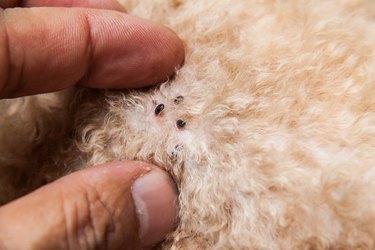
If your pet has fleas, there's a good chance fleas are living in your home as well, after hitching a ride in on your four-legged friend. Signs of fleas include specks on your pet's skin, indicating flea feces, or small particles in the pet bedding that resemble salt and pepper. The fleas themselves may be noticeable hopping around on your pet, in pet bedding or on carpeting in your home.
Check Your Pet
If your dog or cat is continually scratching herself, that may be a sign she has fleas. Inspect her skin by moving the fur around. If fleas are present, you will most likely spot at least a few of them as you check her skin, especially around her neck or near the base of her tail. Flea feces, which look like red or black specks, may also be present on her skin, as well as small scabs from flea bites. Place a piece of white paper or a pillowcase on the ground and have your pet stand on it. Run a fine-toothed comb through her fur, then check the comb and the paper or pillowcase for black specks, which indicate flea feces. Fleas may be on the comb as well. If your pet scratches herself a lot and there are no indications of insects, she may have a different skin-related issue. Consult a veterinarian.
Video of the Day
Video of the Day
Pet Bedding
Inspect your pet's bedding for signs of fleas. Small particles that look a little like salt and pepper may be flea eggs. Lift or move the fabric or cushion to see if any fleas are present. Fleas are brown or black and very small, only 1/12 inch on average, and have no wings. They move quickly and can hop or jump, as well as crawl around in the pet bed. A pet bed is one of the most common places to find fleas, other than on the pet itself, since they often attack while an animal is resting or eating. These same signs may be evident anywhere the pet hangs out, such as on the couch or on your bed sheets.
Carpeting Concerns
Fleas hide within fibers of rugs and carpeting and may be there even if you don't notice them at first. Stand on the carpeting while wearing tall white or light-colored socks. If fleas are around, some of them are likely to jump up onto your socks. Check the carpeting or rug another way by setting a bowl of warm, soapy water atop the rug, then shining a lamp or bright light over the water. Fleas will jump toward the light and land in the water. The soap in the water kills fleas.
Getting Rid of Indoor Fleas
Vacuum all upholstered areas and fabrics where your pet spends time: the furniture, rugs and pet beds, disposing of the vacuum cleaner bag outside the house immediately afterwards. If you use a bagless vacuum cleaner, discard the vacuumed contents in a plastic bag outdoors, tying it closed. Shampoo or steam-clean carpeting; rent a carpet-cleaning device if you don't have your own. Wash all pet bedding, as well as blankets and your own bedding using the hottest setting recommended for each item. Dry the items in a hot dryer. Washing the pet bedding once a week helps cut down on flea infestations. Bathing your pet regularly with soapy water helps eradicate fleas.