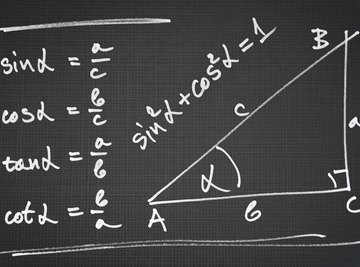
The law of sines and the law of cosines are trigonometric formulas relating the measures of the angles of a triangle to the lengths of its sides. They are derived from the property that larger angles in triangles have proportionately larger opposite sides. Use the law of sines or the law of cosines to calculate the lengths of the sides of a triangle and quadrilateral (a quadrilateral is essentially two adjacent triangles) if you know the measure of one side, one angle and one additional side or angle.
Calculate Triangle Side Lengths
Find the givens of the triangle. The givens are lengths of sides and measures of angles that are already known. You cannot find the measure of a triangle's side lengths unless you know the measure of one angle, one side and either another side or another angle.
Use the givens to determine whether the triangle is an ASA, AAS, SAS or ASS triangle. An ASA triangle has two angles as givens as well as the side connecting the two angles. An AAS triangle has two angles and a different side as givens. An SAS triangle has two sides as givens as well as the angle formed by the two sides. An ASS triangle has two sides and a different angle as the givens.
Use the law of sines to set up an equation relating the lengths of the sides if it is an ASA, AAS or ASS triangle. The law of sines states that the ratios of the sines of a triangle's angles and their opposite sides are equal:
where a, b and c are the opposite side lengths of angles A, B and C, respectively.
For example, if you know two angles are 40 degrees and 60 degrees and the side joining them was 3 units long, you would set up the equation:
You know the angle opposite the side that is 3 units long is 80 degrees because the sum of a triangle's angles is 180 degrees.
Use the law of cosines to set up an equation relating the lengths of the sides if it is an SAS triangle. The law of cosines states that:
In other words, the square of the length of side c is equal to the squares of the other two side lengths minus the product of those two sides and the cosine of the angle opposite the unknown side. For example, if the two sides were 3 units and 4 units and the angle was 60 degrees, you would write the equation
Solve for the variables in the equations to find the unknown triangle lengths. Solving for b in the equation
yields the value
so b is approximately 2. Solving for c in the equation
yields the value
so c is approximately 2.6. Similarly, solving for c in the equation
yields the value
so c is approximately 4.4.
Calculate Quadrilateral Side Lengths
Draw a diagonal through the quadrilateral (choose the diagonal that does not include any given angle measures; for example, if angle A is a given in quadrilateral ABCD, draw the diagonal connecting B and D).
Use the givens to set up an ASA, SAS, AAS or ASS triangle. Remember that the sum of the angles of a quadrilateral is 360 degrees, so you can find the measure of the fourth angle if you know the other three.
Use the law of sines to solve the lengths of the sides of the quadrilateral if you set up an ASA, AAS or ASS triangle. Use the law of cosines to solve the lengths of the sides if you set up an SAS triangle.
References
About the Author
Karl Wallulis has been writing since 2010. He has written for the Guide to Online Schools website, covering academic and professional topics for young adults looking at higher-education opportunities. Wallulis holds a Bachelor of Arts in psychology from Whitman College.