While Skype displays only recent messages by default, you can view older interactions by selecting View Old Messages from the Conversations menu. Alternatively, see messages you deleted from a conversation by using a free program to read the contents of the Skype database file.
See Older Messages
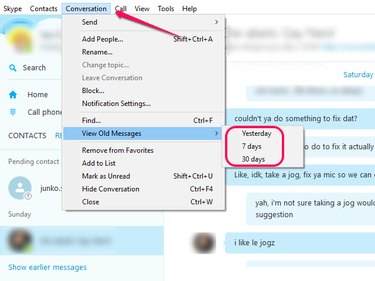
To display older messages, open the Conversation menu and hover your cursor over View Old Messages. From the fly-out menu, select Yesterday, 7 Days or 30 Days, depending on how far back you want to go.
Video of the Day
Video of the Day
See Messages You Deleted
Removing messages in Skype hides those interactions from view but does not delete them from the program's database file.
Step 1
Download and install Skyperious, SkypeLogView or Skype Log Viewer. These free applications are designed to open and read the contents of Skype's database file.
Step 2
Launch the application you just installed and open the main.db file located in the following directory:
C:\Users\YourWindowsUsername\AppData\Roaming\Skype\YourSkypeUsername
Step 3
Use the application's browser to locate the conversation that contains the messages you deleted.