
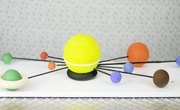
Teaching kids is often a difficult task. Instead of having them sit in their chairs and study, there are alternative ways you can incorporate curriculum material into your lessen plan. One alternative way you can teach your students is using arts and crafts. One common project that you can incorporate into science lessen plans is building a solar system. Having your students build solar systems is a way to have them use their creativity to learn about the universe around them.
- Two 4 1/2-inch Styrofoam rings
- 1iinch Styrofoam ball
- 2-inch Styrofoam ball
- 2 1/2-inch Styrofoam ball
- 3-inch Styrofoam ball
- 4-inch Styrofoam ball
- 6-inch Styrofoam ball
- Two 1 1/4-inch Styrofoam balls
- Two 1 1/2-inch Styrofoam balls
- Yellow, black, orange, blue, green and red acrylic paints
- Two 36-by-1 1/8-inch dowel rods
- Paintbrush
- Ruler
- Glue
- Craft scissors
Cut the dowel rods into lengths of 2 1/2 inches, 4 inches, 5 inches, 6 inches, 7 inches, 8 inches, 10 inches, 11 1/2 inches, and 14 inches.
Paint the Styrofoam balls. For Mars and Pluto, use the 1 1/4-inch balls, for Mercury use the 1-inch ball, for Earth and Venus use the 1 1/2-inch balls, for Neptune use the 2-inch ball, for Uranus use the 2 1/2-inch ball, for Saturn use the 3-inch ball, for Jupiter use the 4-inch ball, and for the sun use the 6-inch ball.
Connect the dowel rods to the planets and to the sun with glue. Place the closest planet, Mercury, on the shortest dowel rod, and then work your way down the longer dowel rods as you move on to each planet in the solar system.
Things You'll Need
References
About the Author
Noah Kain began writing in 2008 for Baltimore Metromix, reviewing restaurants, music and national politics. In 2010 he had three poems published in "Stevenson University's Spectrum Literary Magazine" and has also recorded albums and toured with his band, Mother Nature's Son. Kain graduated from Stevenson University with a Bachelor of Science in interdisciplinary studies and a focus in English and film.
Photo Credits
sonnensystem image by Marvin Gerste from Fotolia.com