Things You'll Need
White paper
Colored pencils or markers
Drafting compass
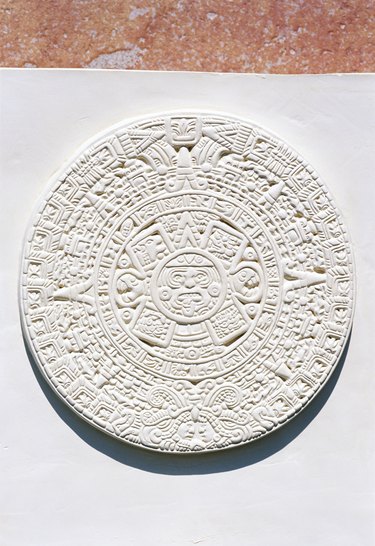
The Aztecs used a calendar of images to represent two activities during their year. The calendar represents the solar year, 365 days; and the worship year, 260 days. In the worship calendar, each god was assigned a 13-day period for worship. In the solar calendar, each time period is represented by festivals linked to events such as the rainy and dry seasons, the harvest, and fertility. The two calendars form what is also called the Sun Stone.
Step 1
Draw a large circle on the white paper using a drafting compass. The paper can be as large as you want the calendar, but should be at least a standard 8- by 11-inch blank sheet.
Video of the Day
Step 2
Draw a small circle in the middle of the large circle.
Step 3
Draw an Aztec face in the smaller circle. Look at pictures of Aztec art to see the usual Aztec representation of a face.
Step 4
Draw a medium-sized circle halfway between the larger and smaller circle.
Step 5
Draw 20 evenly-spaced lines connecting the large and medium circle.
Step 6
Draw the representation of each of the 20 gods to worship in the spaces in between the medium and large circle.
Step 7
Draw triangle arrows, like a compass, on the outside of the medium circle. Draw four large triangle arrows at the top, bottom, and two sides; and then four smaller arrows halfway in between each of the larger arrows.
Step 8
Draw the 18 figures representing the solar calendar festivals evenly spaced between the medium and small circle with the face.
Step 9
Decorate the blank spaces with different-colored geometrical shapes and traditional Aztec patterns.
Tip
Create a corresponding chart that shows what each drawing on the calendar represents.
Warning
Don't start too small or you won't have enough room to add the Aztec symbols.
Video of the Day