Tumblr themes are a combination of HTML, CSS code and special tags used to indicate where your blog's content will appear. As a consequence, you can't just copy the source code for somebody else's blog and paste it as your Tumblr theme -- the result would be a static copy of everything on the first page of that blog. Instead, you need to get the full code for that theme, something that can be done in three ways.
Use the Install Theme Button
Video of the Day
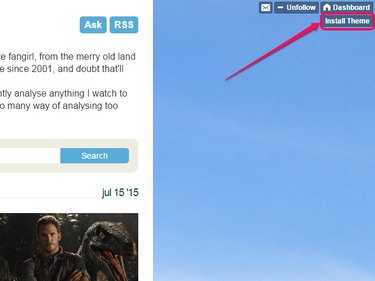
Some Tumblr blogs include an Install Theme button. This is not a default feature, but rather is coded by the theme author. Clicking the button brings you either directly to that theme's page in Tumblr's Themes section or to an information page about the theme; the latter typically includes a link to the former, although you may have to run a search for the theme's name in the Themes section if it does not.
Video of the Day
Look for Theme Information
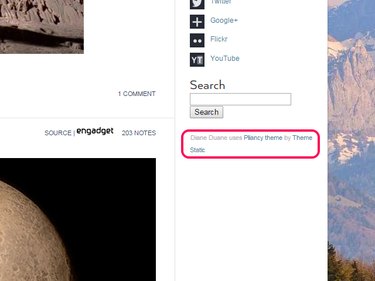
If the theme doesn't include an install button, look in the sidebar or footer for theme information. Again, the theme author codes this, so it may be missing, and the amount of information included can vary from barebones to thorough, and may or may not include links. At the least, the information usually includes the name of the theme, so you can run a search in the Themes section to find it for yourself.
Ask the Blog Owner
If the theme has no identifying information, your last resort is to message the blog owner through Tumblr's social features, to ask what the theme is called and -- if it's a theme she created herself -- if she is willing to share the code. There is no guarantee you'll get an answer or that the blog owner will send you the code for the theme