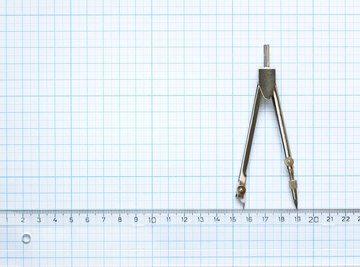

A math compass is a metal or plastic V-shaped drawing tool with a clamp on one end to hold a pencil and a sharp point on the other end that keeps the tool steady on the drawing surface while the pencil moves.
Proper Pencil Position
With the compass ends (or "arms") together so they touch, the pencil is inserted down into the clamp so when the point of the pencil and the compass point (or "needle") are on the table together, the compass is perpendicular (straight) in relation to the drawing surface.
Arc Measurement
The space between the compass arms is adjustable, and the wider apart the arms, the greater the circle or arc radius. A number on the gauge at the apex (or "hinge") of the compass gives the size of the radius that will be drawn.
Drawing Mechanics
Once a measurement is chosen, the arc or circle is drawn by placing the sharp point of the compass at the center of the intended circle or arc, and dragging the pencil around the center to draw the curve.
Uses For
A compass is used in mathematics, drawing and drafting to create arcs, circles or other geometric figures that can be determined by measuring intersecting line segments. A compass can be used to bisect lines, find midpoints and help solve problems in geometry.
Safety Compass
A safety compass (also brand name SAFE-T compass) is a compass that doesn't have a sharp point on the end that could cause injury. Either it has a rubber tip instead of a needle, or it is shaped like a ruler with a circle on one end to anchor it to the drawing surface, while the pencil tip is placed in a hole on the ruler arm and pushed around the center disk to create an arc.
About the Author
Katelyn Kelley worked in information technology as a computing and communications consultant and web manager for 15 years before becoming a freelance writer in 2003. She specializes in instructional and technical writing in the areas of computers, gaming and crafts. Kelley holds a Bachelor of Arts in mathematics and computer science from Boston College.
Photo Credits
tuja66/iStock/Getty Images