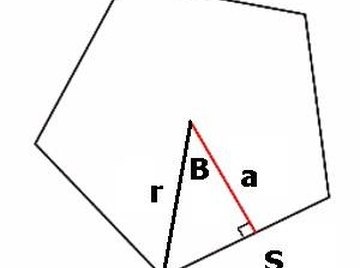
To find the area of a regular pentagon, with five equal sides and angles, you must know the length of each side and the length of the line from the center of each side to the center of the pentagon.
The same method applies to irregular pentagons, except that you break the pentagon into different-sized triangles, find the area of each separate triangle, and add the areas for the total area of the pentagon.
Mark the midpoint of the regular pentagon and draw a line from each of the corners to the midpoint. If you do not know the midpoint, you can draw lines to the middle of the opposite side and erase half of it.
Take one of these lines and extend it to touch the midpoint of the opposite side. This creates the apothem. Do this for each line to create 10 small right triangles with the same area. To proceed further you must know the length of the apothem. If you are working with a physical pentagon, measure the apothem.
Find the area of one right triangle and multiply by 10 to get the total area of the pentagon. The area of a right triangle is found by the formula, 1/2 x base x height. The height is the apothem, and the base is half of a side of the pentagon.
Tips
References
Tips
- The same method applies to irregular pentagons, except that you break the pentagon into different-sized triangles, find the area of each separate triangle, and add the areas for the total area of the pentagon.
About the Author
This article was written by the CareerTrend team, copy edited and fact checked through a multi-point auditing system, in efforts to ensure our readers only receive the best information. To submit your questions or ideas, or to simply learn more about CareerTrend, contact us [here](http://careertrend.com/about-us).