Every wireless network has an SSID, set in the router's options, used to identify the network while connecting. Many Wi-Fi routers have a default SSID set up right out of the box, which is usually found on a sticker on the router. If you've changed the SSID, you'll need to look in the router's settings.
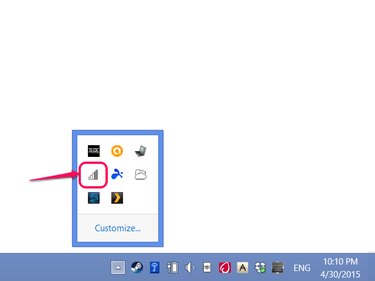
Video of the Day
Find the Default SSID
If you've never chosen an SSID, your router is probably using a default name set up in the factory. Older routers often used their brand names as SSIDs (Linksys, Netgear, Belkin, etc.) but many new devices have unique names. Check the body of the router itself for a sticker with the SSID, which might also be called the network name. You'll also need the password on the sticker to connect to Wi-Fi. If you don't see a sticker, check the instruction manual.
Video of the Day
Find any SSID
To check your router's current SSID, log in to its Web interface. Since you don't know the SSID to connect wirelessly, use a computer connected to the router by an Ethernet cable. In a Web browser, try visiting the address 192.168.1.1, or if that doesn't work, 192.168.0.1 or 192.168.2.1. If none of these work, check your router's manual for the Web interface address or use ipconfig to look up the default gateway, which corresponds to the interface address.
Once you find the right address, you'll need to log in using the router's administrative password. If you've never changed the password, use the default in the manual. Many devices use the user name admin and the password password, admin or a blank password. If these options don't work, look up the password on a site like RouterPasswords, Port Forward or your router manufacturer's website.
In the router interface, look for the wireless settings page to find your SSID. Exact directions vary by model, but you should find a link in the router's basic settings or on the main menu. Once you find the SSID, note down the name and close the browser when you finish.
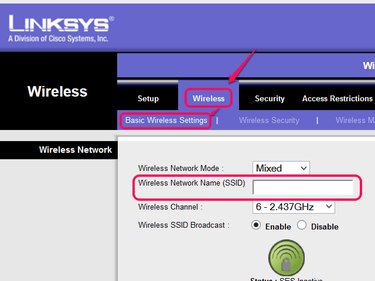
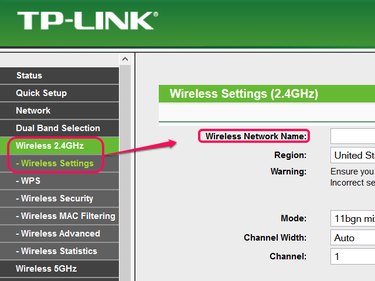
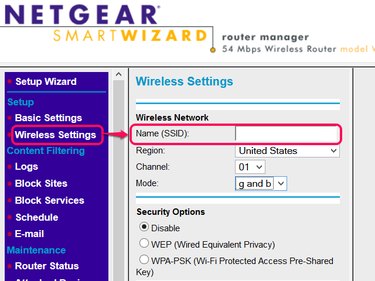
Reset the SSID
Reset your router to factory settings and use the default name on the sticker if you still can't figure out your SSID. Look for a small Reset or Restore Factory Settings button on the router -- often, the button is protected inside a hole and you'll need a pin or toothpick to press it. Press and hold the button until your router reboots to reset the SSID.
- Linksys: How to Access the Router’s Web-Based Setup Page
- Netgear Support: How Do I Access My Netgear Home Router?
- TP-LINK: How Do I Log Into the Web-based Utility (Management Page) of TP-LINK Wireless Router?
- TP-LINK: How Do I Configure the Basic Wireless Settings for My TP-LINK 11N Wireless Router?
- Linksys: Changing the Wireless Network Name (SSID) of a Linksys Router
- Netgear Support: How to View or Change Your Wireless Network Name?