
Tracing your family tree is a rewarding and educational hobby which teaches you about your ancestors’ struggles, ethnic backgrounds, careers and contributions. Learning your family’s history is inspirational, as it can spark interest in exploring a new hobby or visiting a foreign country. Though there are professional genealogists who can help you trace your family tree, there are also databases and other resources which can uncover a lot of information for free.
Compile a list of all the ancestors you know of, and any relevant information about them such as their full names, birth and death dates, where they lived and their countries of origin.
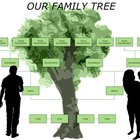
Organize this information in a chart which flows down from the oldest family member(s) to the youngest, connecting spouses by horizontal lines, and connecting children to their parents by vertical lines. Leave space in your chart to add more entries as you learn more.
Ask your parents and other relatives for any additional information about the ancestors on your chart, and other ancestors they know of.
Access a free genealogy website such as Ancestry.com, Family Tree Searcher or FamilySearch. Plug information from your chart into the search fields on their home pages to search for individual ancestors or family trees. Your search may return even more information about these relatives, and may uncover other relatives not on your chart.
Visit your public library website to access genealogy databases, census data, immigration records and death records relevant to your family tree search. Many public libraries offer genealogy databases such as Heritage Quest Online and the Biography and Genealogy Master Index as well as local newspaper archives. You will usually need your library card number to sign in to these services, so you should visit the library system website for your specific county to access its databases.
Visit your public library or a nearby academic library in person to view their microfilm and/or microfiche archives of old newspapers. If you have ancestors from your area, or a notable ancestor who would have been listed in a national newspaper, you can browse through these archives to read their obituaries, marriage announcements or birth notices to learn more information about them, and possibly learn about other family members. If you are unfamiliar with using a microfilm reader, a librarian will be able to assist you.
Related Articles

Bonding With a Long Lost Sibling
How to Find Someone's Birth City & ...

How to Find Your Bloodline

How to Find Deceased High School Alumni

How to Find Ancestry in Singapore
How to Trace the History of a Name
How to Find an Old Teacher
How to Design a Family Tree for Free

How to Find a Deceased's Last Known ...

How to Find a Prison Inmate in ...
How to Find School Records for Family ...
How to Find Someone's Relatives

How to Find an Old Friend in Canada

How to Find Birth Parents for Free
How to Find Out If Someone Applied for ...

How to Map German Surnames

How to Find Old Friends From Elementary ...

How to Find Deceased Classmates

How to Get Rental Assistance for Seniors
How to Find Lost Relatives
References
Resources
Writer Bio
Christina Sloane has been writing since 1992. Her work has appeared in several national literary magazines.
Photo Credits
Crooked Tree, Straight Tree at Sunset image by loongirl from Fotolia.com