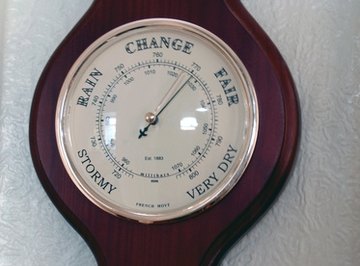
A barometer is a simple instrument for determining the pressure generated by the weight of the atmosphere. It can be used both for assisting in forecasting weather and for determining altitude. You can make your own weather predictions by following changes in barometic pressure.
- Weather Radios
- Humidity Gauge
- Rain Gauges
- Barometers
- Environmental Thermometer
- Wind Gauges
The normal, average sea-level pressure is about 29.92 inches, which means the barometer's needle will rest near 30. Pressures seldom increase or decrease 1 inch above or below the 30-inch mark unless weather conditions are extreme. Generally, low or decreasing barometic pressure means cloudy, unsettled or wet weather, and high pressure or increasing pressure means calm and clear weather. Nonmercury, aneroid barometers work through a small, sealed metal chamber with most of the air inside drawn out. The chamber reacts to the rise and fall of outside atmospheric pressure by contracting or expanding, and a needle is used to display a reading.
Calibrate your barometer only during a period of fair weather, not during stormy weather. Check it every year or so. Read the instructions accompanying your barometer. You may need to make a special adjustment if you live at an elevation greater than 1,000 feet. Remember, changes in pressure are more important than exact readings - a downward trend is a general predictor of stormy weather and an upward trend suggests fair weather. Scientific-grade mercury barometers are expensive and require training and skill to operate properly. They are used mostly in laboratories and weather offices. Do not open a mercury barometer - mercury is poisonous.
Identify your type of barometer. Most personal barometers are "aneroid" while scientific ones are "mercury."
Check to see whether there is an adjustment screw on the back of an aneroid barometer. Read your instructions to learn whether it is necessary to turn this screw to set your barometer to the current pressure reading.
Mount your barometer where it is easy to see and adjust.
Call the weather service, the airport or a news outlet to obtain a current barometric reading.
Turn the adjustment screw, if you need to do so, to set the barometer to the weather service barometer reading.
Check to see whether your personal barometer has two needles. Most have one that automatically follows the changes in atmospheric pressure while the other remains fixed until moved by hand.
Set the movable dial to coincide with the needle marking the current pressure.
Watch for the needle that follows pressure changes to move up or down from that fixed point. Tap the barometer lightly before taking a reading.
Compare readings to weather reports and other reports of barometric pressure to confirm the accuracy of your unit.
Things You'll Need
Tips
Warnings
Tips
- The normal, average sea-level pressure is about 29.92 inches, which means the barometer's needle will rest near 30. Pressures seldom increase or decrease 1 inch above or below the 30-inch mark unless weather conditions are extreme.
- Generally, low or decreasing barometic pressure means cloudy, unsettled or wet weather, and high pressure or increasing pressure means calm and clear weather.
- Nonmercury, aneroid barometers work through a small, sealed metal chamber with most of the air inside drawn out. The chamber reacts to the rise and fall of outside atmospheric pressure by contracting or expanding, and a needle is used to display a reading.
Warnings
- Calibrate your barometer only during a period of fair weather, not during stormy weather. Check it every year or so.
- Read the instructions accompanying your barometer. You may need to make a special adjustment if you live at an elevation greater than 1,000 feet.
- Remember, changes in pressure are more important than exact readings - a downward trend is a general predictor of stormy weather and an upward trend suggests fair weather.
- Scientific-grade mercury barometers are expensive and require training and skill to operate properly. They are used mostly in laboratories and weather offices. Do not open a mercury barometer - mercury is poisonous.
About the Author
This article was written by the CareerTrend team, copy edited and fact checked through a multi-point auditing system, in efforts to ensure our readers only receive the best information. To submit your questions or ideas, or to simply learn more about CareerTrend, contact us [here](http://careertrend.com/about-us).
Photo Credits
barometer image by Peter Baxter from Fotolia.com