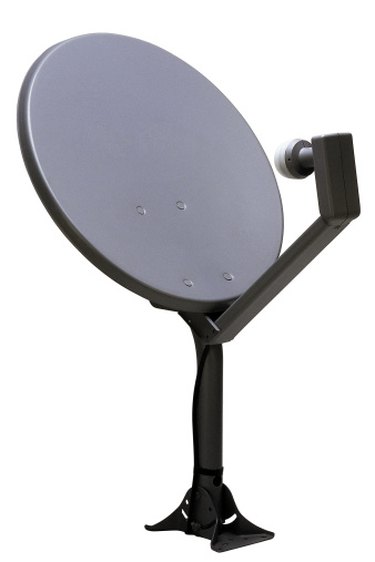
An LNBF (Low Noise Blocker) is a bracket at the end of the arm extended from the bottom of a satellite dish. The LNBF is aimed towards the dish and receives the information that is gathered by the dish and sends it to your satellite receiver. If your LNBF malfunctions or needs to be upgraded, it does not necessarily mean you have to replace the whole dish. Most LNBFs can be removed and replaced with a new one.
Step 1
Locate the screws holding the LNBF to the arm extended from the bottom of the dish. The screw or screws, depending on the style of dish you have, will be on the bottom of the LNBF going into the arm.
Video of the Day
Step 2
Take your adjustable wrench, and hold the nut connected to the screw holding the LNBF in place.
Step 3
Remove the screw while holding the nut in place using a Phillips screwdriver by twisting the screw counterclockwise until the screw comes out.
Step 4
Slide the LNBF off the arm. Be careful removing the LNBF from the arm, because there will be cables connected to the LNBF.
Step 5
Remove the cables from the LNBF by twisting the end of the cables counterclockwise until the cable comes off the connection. Remove all cables until the LNBF is free.
Video of the Day