Ralf Nau/DigitalVision/Getty Images
Age is just a number, it really is true. But if you're past midlife, you might be feeling down about your age. You can still appear younger and look amazing after you've stepped through the door that was opened on your 60th birthday. As overwhelming as it may seem, it's simply a matter of understanding how to dress yourself, arming yourself with products that are best for reducing aging effects and taking good care of your body. Amp up your knowledge, and soon you'll feel great about your age and how you look.
Face The Mirror
Avoid face powders, which tend to settle into lines and wrinkles and actually draw more attention to these signs of aging. Because older skin doesn't produce extra shine, you probably don't need to use powder at all. If you are trying to cover a blemish, both men and women can benefit from a stick foundation. Choose a color near to your natural skin color. Use a small, pointed brush to spot-apply, and then pat with your fingers to blend.
Reduce wrinkles with retinol cream or fluid. Retinol is a vitamin-A derivative that ups collagen production and normalizes cell renewal -- all of which will help to prevent dull, blotchy skin that can occur as men and women age. Retinol can be found in over-the-counter products at your local pharmacy, or you can get a prescription for stronger retinol products from a dermatologist. Apply every other night and work up to every night for best effects, but apply with a gentle touch. Finish with a moisturizer once the retinol cream has been absorbed. Do not use retinol if you have rosacea or eczema.
Brighten your eyes. Men can use an eye cream -- not a lotion -- to hydrate the skin around the eyes, helping these delicate areas to be less puffy in the morning. Women may use an eye cream, followed by a medium-dark shade of eye shadow in a sideways "V" shape that will create the effect of lifting the lids. Makeup expert Bobbi Brown suggests applying shadow to the upper outside corner of your eyes, then sweeping inward and downward toward the crease with the applicator. Brush from the outside lower corner of the eye back up to the crease. Line the eyes by gently pulling an eye pencil across the roots of the upper lashes. Smudge the line with your finger to add more depth, or use the liner pad on the opposite end of the eyeliner stick.
Pluck away stray eyebrow hairs to achieve a polished look. Be careful not to over pluck -- your hair growth changes as you age, and the hair may not grow back as it once did. Both men and women should cover gray brow hair with a brow powder or brow mascara as opposed to plucking grays out. Choose a color in the shade of your natural hair color.
Color your lips. Women should choose soft tones, such as berry or rose, to restore natural lip color. Finish with a bit of gloss to add plump, and trace with a clear lipliner to restore the natural lip line. Men will not need a color or liner to look younger; they should repair dry, cracked lips with a Vaseline cream to hydrate them and keep them looking youthful.
Whiten your teeth. Yellow, stained or dingy teeth can add years to the appearances of both men and women. To off-set this, combine baking soda with one or two drops of hydrogen peroxide. Brush the formula onto your teeth, then let it sit for one to two minutes before rinsing -- do not swallow. Men and women may buy at-home whitening kits, like white strips, or whitening toothpastes to brighten up teeth. If you have very stained and yellow teeth, talk to your dentist about professional whitening options.
Brighten And Protect
Apply sunscreen every morning and throughout the day. Sunscreen will protect against harmful UVA and UVB rays, which not only increase the risk of cancer, but can cause premature aging in men and women. Sunscreen should be used regardless of the weather, as these rays can break through the clouds. Use a sunscreen with an SPF of 30 or higher.
Drink more water. Six to eight glasses a day will help the skin of both men and women stay elastic and look more vibrant, as well as off-set the appearance of wrinkles.
Polish your nails. Women may apply a sheer coat or a pale pink to deflect attention from age spots and make hands appear younger and nails less brittle. Men can polish nails with a clear coat of polish for the same, subtle effect.
Beautify Your Body
Exercise regularly. Weight-lifting counters a slowing metabolism and burns extra calories per day. Cardio will keep your heart healthy and give you more energy. Yoga will improve posture and counter the effects of swayed backs by way of core strengthening. Exercise also provides men and women with more radiant skin, which will allow you to appear less tired and run-down. Follow a regimen that combines cardio with weight-training and yoga sessions. For example, you can sculpt for 20 minutes, do cardio for 30 minutes and do yoga for 10 minutes -- or vary your workout by day. Invest in a few sessions with a personal trainer at your local gym to obtain a workout that will fit your needs and keep you working out safely.
Tailor your clothes. Each person has a style that ups his or her comfort and confidence level -- and the more confident you are, the younger you naturally look. Perfect this style with a wardrobe of well-fitting and tailored clothes; clothing that is too tight or saggy and baggy will automatically pack the years onto your appearance. Don't retreat behind a curtain of bland and formless clothes; explore your style options through magazines and style shows -- you may be surprised at how many different styles appeal to you now that you have the confidence that comes with life experience.
Eat healthy. Foods that are rich in antioxidants combat the effects of aging and help to prevent disease. Antioxidant-rich foods include fruits and vegetables -- like onions, broccoli, apples, red grapes, and berries -- as well as moderate amounts of dark chocolate, red wine and green tea. Healthy fats, especially omega-3s, renew skin cells to keep them looking young and moist. Walnuts and salmon are rich in omega-3 fats, as are eggs, cereal, yogurt, and cheeses and milk that are fortified with DHA -- a type of omega-3. Cut out greasy, fatty foods, which can lead to health problems and trigger obesity, and stop excessive drinking and smoking -- both have been proven to increase the risks of cancer and disease, and they intensify the effects of aging.
Hurrah For Hair
Get a haircut. For women, shoulder-length or shorter hair will make you look more youthful than long hair, which has a tendency to draw attention to any other part of the face that may be lengthening, or sagging downward. Layers add fullness and bounce, and bangs will hide forehead wrinkles and distract from crow's feet. If you have a round face, opt for layered wisps that touch your eyebrows. Square faces should opt for long, side-swept bangs, and long faces should go for a full, blunt bang that hits above the brows. For men, well-groomed hair can instantly make you look more youthful. Get regular trims, especially if you have thinning hair, as long sparse hair can be particularly aging. If you have facial hair, keep it neat. If you've worn the same hair style for the past 10 or more years, consider talking to your hair stylist about an updated look, which can also refresh your appearance.
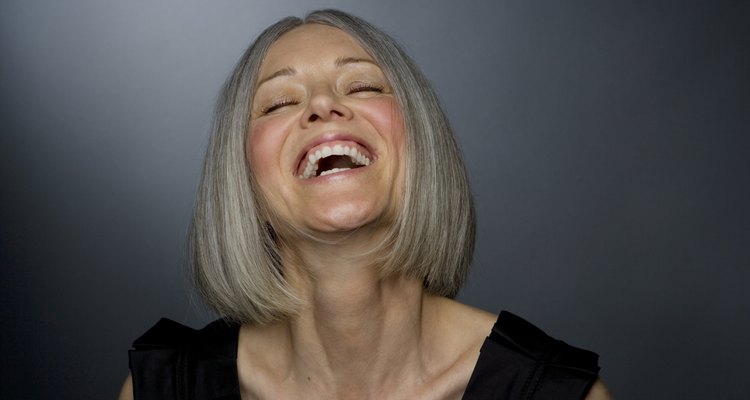
Cover -- or own! -- your grays. You may choose to completely cover over your grays professionally, or you may do it yourself with an at-home kit. Opt for one shade darker than your natural color so as not to highlight your grays with a lighter shade. Some men and women may choose to keep their gray, silver or white hair. According to Lisa Chiccine, a professional hair stylist in New York City, "Gray or white hair tends to look best with pink, olive, and dark complexions. If you're sallow or very pale, you'll probably look washed-out and should consider highlights or lowlights." You can weave in highlights or lowlights with your gray hair to brighten and enrich the original color while still keeping your tasteful grays. A vegetable dye or a semi-permanent glaze will stain gray hair, so that when the artificial color begins to fade, your root line won't show. Use a weekly deep conditioner to calm and moisturize wiry grays, and add two drops of orange essential oil or grapefruit essential oil into your conditioner to lock in shine. This is especially effective right after you color your hair.
Flatter your grays with proper hues. If you choose to keep your grays, you can avoid looking washed out by dressing yourself in warm and bright colors. Pair neutrals -- whites and blacks -- with a pop of color, such as a bright red sweater or bold yellow jeweled necklace. Avoid the aging effects of pale pastels, like mint green and lemon yellow. When choosing shades of blue and brown, pick deep, dark colors -- chocolate brown and royal blue -- to contrast with and flatter your hair color.
Eat for nutritious hair. It's not just your body that can benefit from healthy eating. Certain foods can help create more lustrous locks. Eat foods that are rich in biotin, -- a B vitamin that is essential for hair growth and scalp health -- like eggs, certain kinds of nuts, wheat bran, salmon, avocados and low-fat cheese. Incorporate more spinach into your diet -- which is rich in folate and iron -- to help red blood cells carry oxygen; this can prevent hair loss. Lentils are a source of iron-rich protein, which is necessary for cell growth -- including hair cells. Vitamin-C rich foods -- bell peppers, oranges, broccoli -- will help to prevent dry, splitting hairs; Vitamin-A rich foods -- sweet potatoes, butternut squash, carrots -- will prevent dry, lifeless hair.
Related Articles

Hair Color Guide for Women Over 50

Makeup Tips for Women With White Hair

Can You Change Skin Tone with Food?
Lemon Juice Vs. Apple Cider Vinegar as ...

Vitamins for Mental Alertness

How to Get the Dewy Makeup Look Over 50
How to Prevent Cheek Wrinkles

How to Make Black Hair Look Natural

How to Make Black Eyebrows Brown
How to Nourish the Scalp
Cute Simple Makeup Ideas for Teenage ...

How to Apply Eyeshadow for Women Over 50
How to Improve the Appearance of Aging ...

Does Yoga Reduce Cellulite?

What Does Eating a Lot of Spinach Do ...
How to Get Your Highlights Brighter
What Are the Benefits of BioSil?

How to Reduce Redness

Hairstyles for Older Women With Round ...

Can You Shrink Pores Using Vegetables?
References
- EPA: Health Effects of UV Radiation
- Allure: 5 Easy Makeup Tricks That Make You Look Younger—Now
- Joy Bauer: Best Foods for Healthy Hair
- Experience Life: 8 Ways Exercise Makes You Gorgeous
- Prevention: The Years-Off Workout
- Women's Day: Eat To Look Younger
- She Knows: Clothing Tips for Gray Hair
- Oprah.com: The Gray Hair Bible
Writer Bio
Laura Gianino works at a publishing company in New York City. Her writing has appeared on eHow, LIVESTRONG, Synonym and Global Post.
Photo Credits
Ralf Nau/DigitalVision/Getty Images