Ever since the nineties, AOL has allowed users of its AOL Desktop software to converse with other users in chat rooms. Browse existing chat rooms or create a new one by using the Chat Room Listings keyword.
Join a Chat Room
Step 1
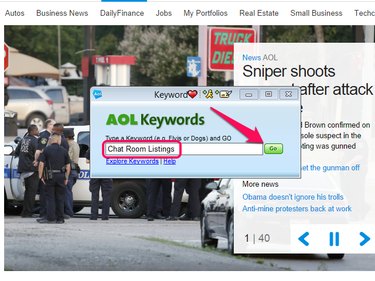
Open the Keyword window by pressing Ctrl+K, enter Chat Room Listings in the text field and click Go.
Video of the Day
Step 2
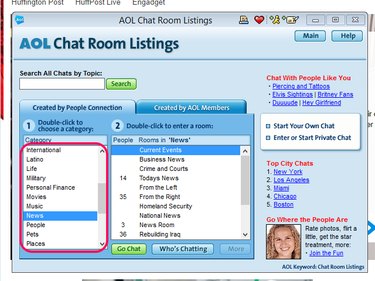
Double-click a category to select it.
Step 3
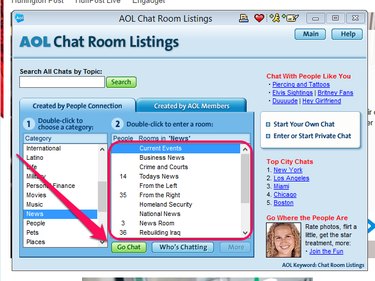
Select the chat room you want to enter and click the Go Chat button to open it.
Create Your Own Chat Room
Step 1
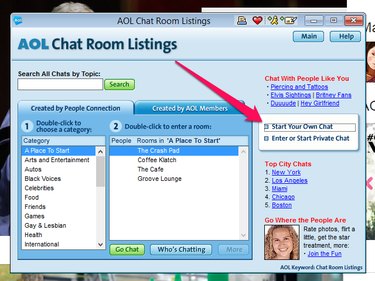
Use the AOL Chat Listings keyword to open the Chat Listings window and click the Start Your Own Chat link.
Step 2
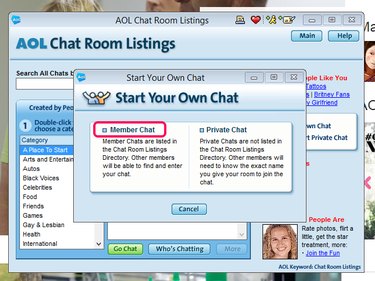
Click the Member Chat link.
Step 3
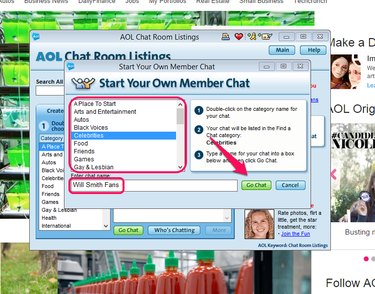
Double-click the name of the category under which you want your chat room to appear and enter your room's name in the text field. Click the Go Chat button to save and join your new chat room.
Video of the Day