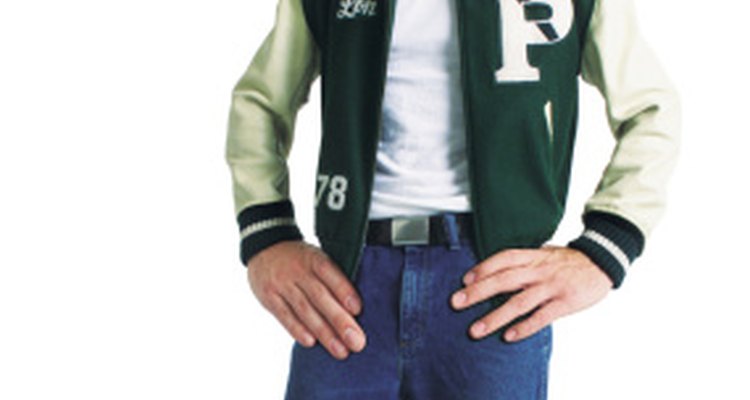
Varsity jackets, or letterman jackets, became popular in the 1950s when stars such as James Dean sported them in movies. Letterman jackets were usually made of wool and leather, according to Hart's Fabric. The jackets often displayed a person's name on the left breast, a letter on the right breast and sometimes a mascot on the back. Letterman jackets are still worn by students in high school and in college today.
The Jock
If you wore a varsity jacket in the 1950s, you were probably a "jock." Jocks were students who were top athletes in a sport such as football or basketball. Letterman jackets were given to the top players on the team or to the team captains. The letterman jacket was a sign of esteem in the 1950s, and went along with the preppy style that was popular at the time. Jocks sometimes gave their girlfriend their letterman jacket to wear.
Harvard
The history of the varsity jacket dates back to 1865 at Harvard University, according to CVC Sports. The school first added an "H" to the front of its baseball team's flannel shirts, and Harvard's football team adopted the trend about 10 years later. Pins and patches were added to the jacket for outstanding achievement or contributions to the team. The tradition of wearing the jacket was later carried over to other universities and high school sports teams.
Fabrics
Letterman jackets can be made of a variety of fabrics. In the 1950s, they were traditionally made of wool and leather, according to Hart's Fabric. However, later on they were also made of corduroy, gabardine, heavyweight cotton or suede. Girls' jackets usually come with a hood, while men's jackets have a banded collar. Sometimes, patches and stripes are added. Patches usually designate championships won. Stripes indicate how many letters were won, while a star indicates a team captain, according to Mount Olympus Awards.
Preppy Image
The letterman jacket was worn in many movies, by stars including James Dean, Ricky Nelson and Elvis Presley. Letterman cardigans and vests were also popular during the 1950s, as the Ivy League style, or preppy style, caught on in the United States.
Related Articles

Creative Ways to Put Pins on Letterman ...
1958 Men's and Women's Dress Styles

Clothes Worn in the Seventies
School Uniforms in the 1940s
Type of Font Used on School Jackets

Men's Clothes & Styles in the 1920s & ...
The History of Denim Jackets
How to Tell How Old a Lee Rider Jacket ...

What Did Men Wear During the ...
How to Dress Like Jacqueline Kennedy

What Did Men Wear in the '50s?
Military Dress Blues Setup Guide
How to Tell an Authentic Chanel Jacket
What Did Teenage Boys Wear in the 1950s?

Different Kinds of Blouses
How Did Teenagers Dress in the '60s & ...

What Type of Shirt to Wear With a ...
What Teenagers Wore in the 1940s

How to Wear a Collar Brass Class A ...
Men's Fashion of the 1930s
References
Writer Bio
Maria Woehr is a journalist with over 10 years of professional writing experience. She started editing in 2006 and has been published in "The Westfield Leader Times," "Insurance & Technology Magazine," "InformationWeek," "Positive Thinking Magazine," "Go Magazine," "The Deal," "The Financial Times" and many other outlets. She is a graduate of Boston University and has a master's degree from Drew University.
Photo Credits
Photodisc/Photodisc/Getty Images