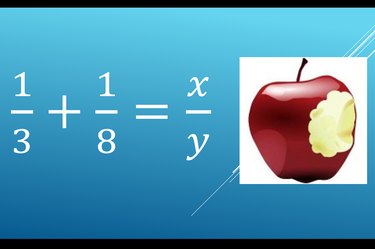
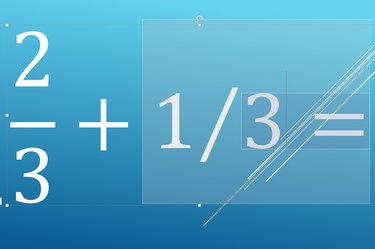
Whether you are inserting a single fraction in a line of text or need to enter a complex equation, PowerPoint 2013 can handle just about any math you need, including fractions. To stack the numerator directly above the denominator, use PowerPoint's Equation mode, found in the Insert options. PowerPoint can also display fractions in a linear format, with the numbers side-by-side instead of one above the other. The skewed format presents fractions at a 45-degree angle, halfway between the stacked and linear formats.
Inserting Fractions
Video of the Day
Step 1
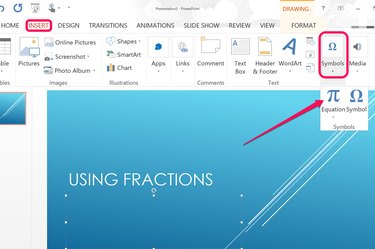
Place the cursor in a text box inside any PowerPoint slide where you want the fraction to appear. Click the "Insert" tab, the "Symbols" button and then select "Equation." The words "Type Equation Here" appear at the cursor.
Video of the Day
Step 2

Type the fraction you need, beginning with a numerator, followed by a slash and then a denominator. This can be any fraction you want, such as 1/2 or 110/3 or x/y.
Step 3
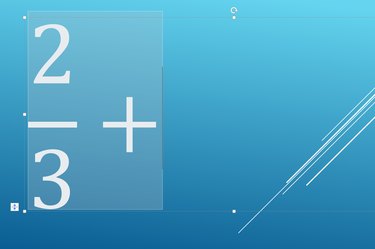
Press the "Space" key when the fraction is finished if you need to add additional numbers or symbols. Press "Enter" to exit PowerPoint's Equation mode. PowerPoint automatically transforms the fraction to a vertical, or stacked, format.
Using Different Fraction Formats
Step 1
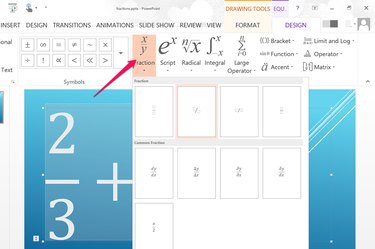
Place the cursor in a text box where you want the fraction to appear. Click the "Insert" tab, then "Symbols" and then select "Equation." Click the "Fractions" icon before typing any numbers and select the format you want, such as a skewed, linear or small fraction. The preview in each thumbnail shows you how the fraction will appear.
Step 2

Click the first box, enter the numerator, press "Tab" and enter the denominator. You can go back and change the numbers in the fraction at any time. If you want to change a fraction's format, delete the current fraction, select the desired format and then type the numbers again.
Step 3
Press the "Enter" key to exit PowerPoint's Equation mode. Alternatively, click the "Symbols" icon in the Insert ribbon and select "Equations." You can now enter additional text in the text box without it being added to the equation.