Internet Explorer's pop-up blocker is on by default, but you can turn it off if you don't want to use it. Its default settings don't block all pop-ups and don't allow for sites where pop-ups are a feature rather than an advertisement, but you can change its settings to customize how it works.
Turn Pop-up Blocker On and Off
Video of the Day
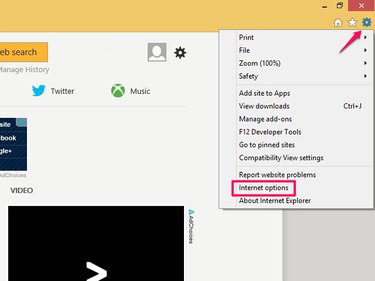
Select the gear wheel icon and open Internet Options.
Video of the Day
Select the Privacy tab. Check the Turn On Pop-up Blocker box to turn it on or uncheck it to turn it off.
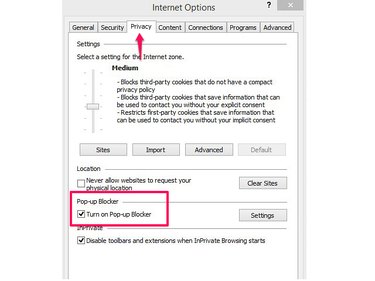
Select OK or change settings to customize the blocker.
Change Settings in Pop-up Blocker
When you enable the pop-up blocker, it defaults to blocking pop-ups from most websites, giving you an alert whenever it blocks. You can change its settings to apply to all pop-ups or switch to a lower security level. If the blocker prevents you from accessing a website correctly, customize the tool to whitelist the site, setting it as an exception to allow its pop-ups.
Select the gear wheel icon on an Internet Explorer page and select Internet Options. On the Privacy tab, select Settings in the Pop-up Blocker area.
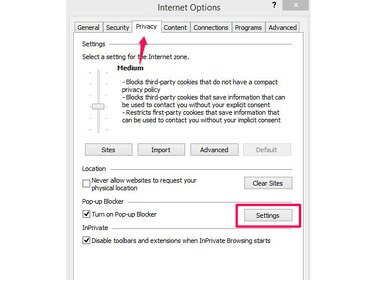
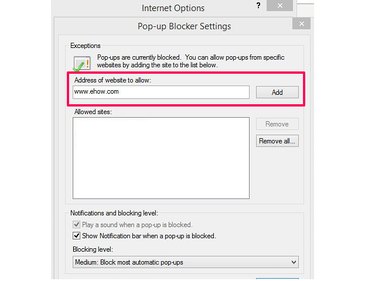
To whitelist a site, type its URL in the Address of Website to Allow: box and select Add.
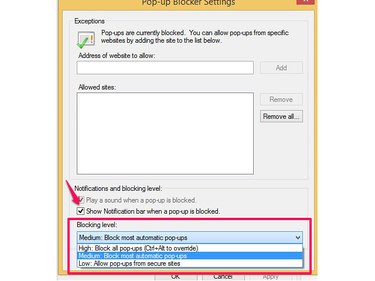
Internet Explorer displays a notification bar when it blocks a pop-up. If you don't want to see this message, uncheck the Show Notification Bar When a Pop-up Is Blocked. To change the default security setting, choose an option from the Blocking Level menu. Select High to block all pop-ups, Medium to block most and Low to allow access from sites that Internet Explorer considers to be secure. When you're done, select Close.
Manually Manage Blocked Pop-ups
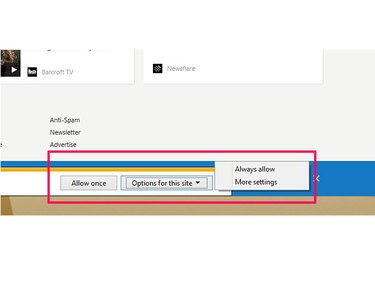
If you enable pop-up notifications, you can control pop-ups on the page. On the message, select Allow Once to allow pop-ups for the current browsing session only. To add a site to the blocker's whitelist, select Options For This Site and Always Allow. More Settings takes you to the Internet Options menu.