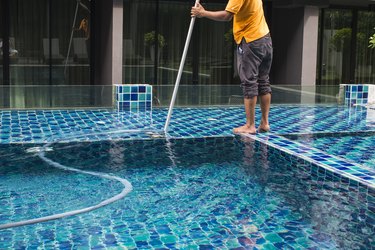
If you have a pool, it will inevitably collect debris such as leaves, sticks and dead insects, and when these fall to the bottom, you need a working pool vacuum to remove them. You also need a vacuum when you flock the pool to get rid of sediment that's making the water cloudy. If the vacuum doesn't seem to be doing its job, the problem is usually easy to fix. Understanding how the vacuum system works helps you look in the right places when diagnosing the problem.
Anatomy of a Pool Vacuum
Video of the Day
A pool vacuum is a relatively simple device in which the swimming pool's pump system is used to draw water through the head of a portable vacuum appliance that scrubs along the bottom and sides of the pool. Setting up the vacuum is a simple matter of attaching suction hoses into the pool's pump system and turning the pool pump on. Some vacuums do their work automatically, while others must be run along the pool surfaces by hand with an extension pole, but in either type, internal filters or nets in the vacuum head trap the debris from the pool water.
Video of the Day
Provided your pool pump system is working correctly, the vacuum itself should operate fairly flawlessly. So if the pool vacuum stops working correctly, the first place to look is with the pool's filtration pump system.
Problems with the Pool Pump
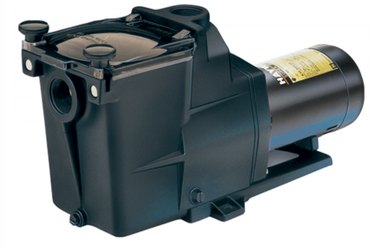
The heart of the pool pump system is typically the circulation pump, which also runs the filtration system. The pump may be nearby in a small housing next to the pool or in a separate shed located some distance from the pool. When you examine it, you'll see that it has two sections—a suction side and a discharge side. Water coming into the suction side is usually visible through a glass plate on the top of the pump housing.
The pipes that lead to the suction side of the pump come from the pool skimmers, which are built-in buckets on the sides of the pool and accessible from the deck. The pipes from the discharge side of the pump lead to the nozzle-like return jets on the sides of the pool. When the pump is working properly, you should be able to feel the water blowing out through these jets.
When it's time to vacuum the pool, you typically attach the vacuum's hose to the intake port at the bottom of the skimmer. You then choose the vacuum function on the pool control panel; this begins to draw water through the skimmer pipes. Then, attach your pool vacuum hoses to the skimmer hose fitting, and you're ready to vacuum.
Suction-Side Problems
If the vacuum doesn't work, it's usually either because air is getting into the vacuum hose or into the suction side of the pool pump. The presence of air in the lines is preventing the system from drawing water as it should. Possible reasons for this problem include the following:
- The water level in the pool is too low. Make sure the water is high enough to cover all the skimmers—if there is more than one—and all the return jets.
- The suction hose for the vacuum has holes, or it isn't fully connected. Verify that the vacuum hose is firmly inserted into the inlet port at the skimmer; then inspect the hose for cracks or holes.
- The skimmer filter is dirty. Pull out the filter basket and check for debris that may be interfering with water flow to the pool pump.
- Air is getting into the pump through the pump cover. Turn on the pump and look through the plate to check for bubbles inside the pump itself. If you see any, and you've already eliminated hose problems as a cause, the O-ring seal on the cover probably needs to be replaced.
To replace the O-ring on the cover, turn off the pump and remove the cover, which requires removal of the bolts or screws holding it. Using a screwdriver, pry off the old O-ring. Treat the replacement O-ring with pool seal lubricant. Do not use petroleum jelly, which can degrade the rubber. Work the O-ring into place with the screwdriver; then replace the cover and tighten the bolts firmly.
Discharge-Side Problems
Discharge-side problems are less common—check for them only after verifying that everything is working on the suction side. The most common issue is a failed seal on the union connecting the pump to the discharge-side pipes. When this happens, you might see a small amount of water squirting from the union when the pump is working, and that usually means you need to replace the seal.
To replace the seal on the union, turn off the pump and unscrew the union. When you separate it, you'll see an O-ring on the male side of the fitting. Pry it out with a screwdriver, and lubricate a new one with pool seal lubricant and set it in place, using a screwdriver to work it into its groove. Reconnect the union and tighten the nut with a pipe wrench. Turn on the pump and check for leaks, tightening the union as needed to make them stop.
Problems With the Pump Itself
If the vacuum continues to be non-functional after you've inspected the suction and discharge sides of the pump, the most likely culprit is the motor shaft seal inside the pump. It is possible to replace this seal yourself, but it involves disassembling the pump. If you're not mechanically oriented, you may wish to get a pool pro to take care of this job.
Problems with the Vacuum Unit
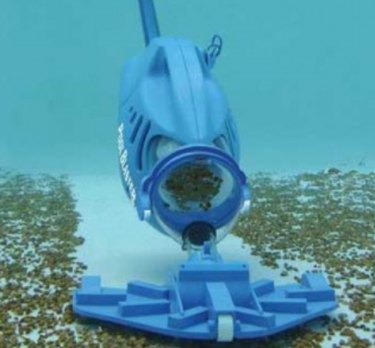
Although most vacuum problems lie with the pool pump system itself, it's also possible that the vacuum appliance itself may have a problem. Because the vacuum is such a simple device, it's usually pretty easy to track down the problem if this is where it lies.
Air in the Vacuum Hose
The vacuum will work correctly only if the hose is entirely filled with water. If the vacuum fails to suck water, check to make sure the hose running from the vacuum head to the skimmer fitting is filled with water. This is easily done by detaching the hose and submerging it in water before reattaching it.
Clogged Vacuum Filters
Like a household floor vacuum, when the filters on your pool vacuum become filled with debris, it may prevent the system from pulling water through it. Removing and cleaning the filters in the vacuum head, as directed by the manufacturer, may return it to perfect function.