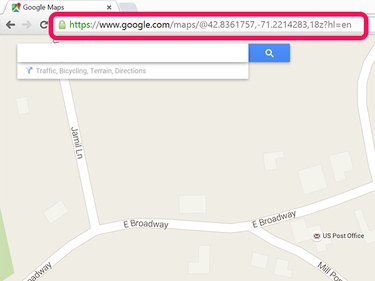
Google Maps uses a variety of pins, which you can remove at any time, to mark locations. The manner in which you remove the pins varies, depending on what the pin is used for.
Removing Pins
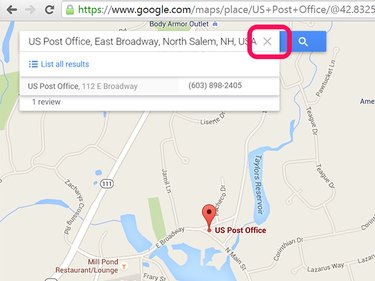
To remove a pin that marks a location you searched for, click the X on the right side of the Google Maps Search field. Removing this pin doesn't affect the map position.
Video of the Day
Video of the Day
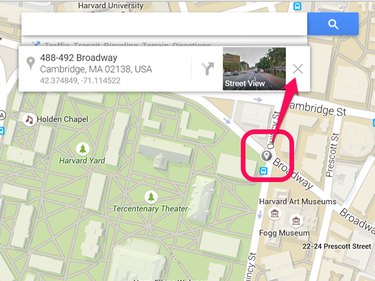
Clicking on a map usually marks it with a What's Here pin. You'll notice an Information window appear just below the Search field. To remove a What's Here pin, click the X in the Information window.
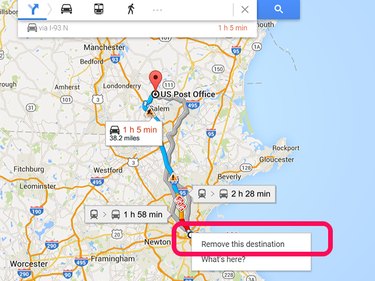
When you use Google Maps to find a route to a destination, pins mark the starting point and the destination. Depending on the route, pins may also mark locations along the route, including detours. To remove any of these pins, right-click the Pin and select Remove this destination from the drop-down menu.
Using Maps Without Pins
After removing the pins from Google Maps, you can zoom in and out of the map, or drag the map to center it somewhere else, just as you would if the pins were still there. If you save the map, copy the URL to share with a friend, or create an embed link to put on a website, the link will take people to the map you were looking at when you grabbed the link -- not the original pinned map.
If you look at the URL in the Web browser's address bar, you'll see that it changes whenever you adjust the map's location. So if you have a pin in Boston, MA, for example, and then remove the pin and center the map on Salem, NH, the URL will change from a map of Boston to a map of Salem. Google Maps URLs use GPS coordinates to mark locations.