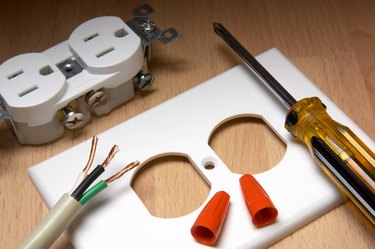
If you've done some home wiring but aren't an expert, you might have some reservations about wiring a light switch and outlet on the same circuit. But actually, there's no problem with this configuration. You can even add an outlet from a three-way switch if that's the most convenient power source for the outlet. Don't be confused by the fact that a switch doesn't have neutral terminals. In wall switch wiring, the neutral wires are spliced together in the switch box to provide a continuous return path from the switched fixture to power. When it comes to hooking up the outlet, the procedure is no different than wiring it to any other power source. It doesn't matter whether the outlet you're adding is a conventional one or a GFCI.
Work Safely or Hire a Pro
Video of the Day
It's important to follow all safety precautions when doing your own electrical work. These include making sure the power is off before doing any wiring and double-checking wires with a voltage tester to be sure they're dead before touching them. If you don't feel confident enough in your electrical wiring skills to complete a project such as wiring a GFCI outlet, which is a little more complicated than wiring a conventional one, don't hesitate to call a professional electrician to make sire the job is done safely and correctly.
Video of the Day
Running Cable Between the Switch and Outlet
Running an electrical cable behind a wall covered with drywall can be a challenge. If the new outlet is on the same wall as the switch, and the two are close enough, you might consider removing some drywall and patching the wall when you're done running the cable. If the outlet is too far away for that, most electricians feed the cable into the attic or basement, drilling a hole in the top or bottom plate of the wall as needed. They then run them laterally where they can be fed vertically to the location of the outlet through another hole in the wall plate.
Be sure to use cable with the same wire gauge as the cable powering the switch. The electrical code doesn't permit changing wire gauge in a circuit. Cut the hole for the outlet box before you run the cable, but don't install the box until you pull the cable through that hole.
How to Add an Outlet to a Light Switch
Inside the switch box, you'll find a cable that comes in from power, one that goes out to the fixture controlled by the switch and the new cable for the outlet you're adding. Use a voltage tester to distinguish the live circuit hot wire from the other hot wire connected to the switch. The best way to do this is to turn off the switch and test both black wires by putting one of the leads of a voltage tester on the wire and the other lead on the ground screw. The tester will light up when you test the live wire. Once you know which one it is, turn off the circuit breaker before continuing the wiring procedure.
Disconnect the live wire from the switch and splice it together with the black wire going to your new outlet, adding a 6-inch length of spare black wire of the same gauge to make a pigtail. Twist the three wires together clockwise and screw on a wire cap, then connect the short wire back to the switch. You've now created a continuous hot path to the outlet that doesn't pass through the switch.
Unscrew the cap from the two white wires joined in the switch box, add the white wire going to the outlet and screw the cap back on. You may need a larger cap. Now you have a return path from the outlet to the panel. Finish the wiring procedure in the switch box by twisting or crimping the three bare ground wires together and attaching one of the wires to the ground screw on the switch. This gives you a continuous ground path.
To hook up the outlet, connect the black wire in the outlet box to one of its brass terminals. If the outlet is a conventional one, you can choose either terminal, but if the outlet is a GFCI or AFCI, choose the terminal marked LINE. Attach the white wire to the chrome terminal across from the one to which you attached the black wire. On a GFCI, this will be the other LINE terminal. Finally, connect the ground wire to the green ground terminal.
How to Add an Outlet from a Three-Way Switch
Instead of two brass terminals, a three-way switch has one brass one and two black ones. You don't need to worry about the wires connected to the black terminals. They go to the switched fixture and to the other three-way switch. Just remove the black wire from the brass terminal, make a pigtail that includes that wire, the one going to the new outlet and a short length of wire, then attach the short wire back to the brass terminal. Splice the white and ground wires in the same way you would for a conventional switch, then hook up the outlet.