Netflix has become one of the most popular TV and movie streaming platforms today. For the deaf, hard of hearing, non-native English speakers, or people who just enjoy it, enabling closed captioning may be necessary to thoroughly enjoy your viewing experience. Luckily, enabling closed captioning subtitles is pretty simple regardless of what device you're using to access Netflix.
Mobile (iOS/Android)
Video of the Day
Your iOS or Android Netflix app provides a built-in capability to enable closed-captioning quite easily.
Video of the Day
During playback, tap anywhere on the screen to access the toolbar and then tap the dialog icon.

Tap to select your desired subtitle option and then tap OK.
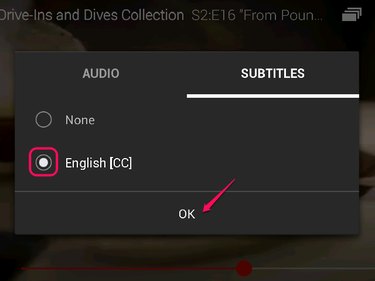
Web Browser (PC)
Using Netflix from your Web browser? Enabling closed captioning is just as easy.
During playback, hover over the dialog icon in the toolbar and click to select your desired subtitle option.
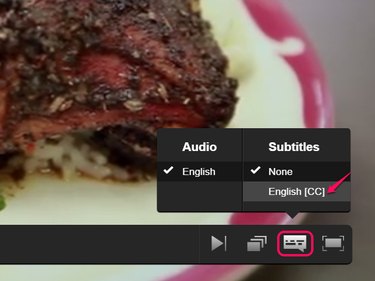
Game Systems (PS4 / Xbox One)
Closed captioning can easily be enabled on your favorite game system as well. The Netflix app on both Sony and Microsoft's latest offerings includes this functionality.
- During playback, press down on your controller.
- Select Audio & Subtitles and press X on PS4 or press A on Xbox One.
- Use the directional buttons to select your desired subtitle option and press X on PS4 or press A on Xbox One to confirm.
Blu-ray Players, Smart TVs, and Set-Top Boxes
You can also use closed-captioning on your smart TV, Internet connected Blu-ray player, or set-top box. These devices include Samsung smart TV, Roku, Apple TV, and Google TV, among others. Although there are some interface differences between devices, these steps should allow you to enable subtitles on most devices.
Before playback
- Launch the Netflix app on your device.
- Select your desired movie or TV show.
- Enter the options panel and select Audio & Subtitles.
- Highlight and select your desired subtitle option.
- Return to the main screen for your selected movie or TV show.
- Press Play.
During playback
- During playback, press the down arrow on your remote.
- Select Audio & Subtitles from the options.
- Select your desired subtitle option.