Deleted Gmail chat logs and messages remain in your Trash folder for 30 days, and you can find them there to return them to your Inbox. Gmail automatically logs chat sessions unless you manually disable chat logging.
Recovering a Message or Chat Log From the Trash
Step 1
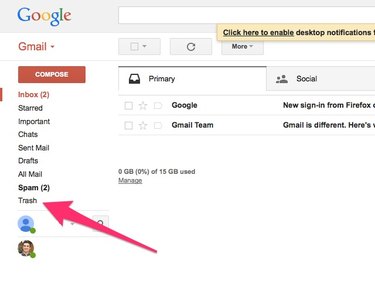
To see your deleted messages in Gmail, click the Trash label in the left pane.
Video of the Day
Step 2
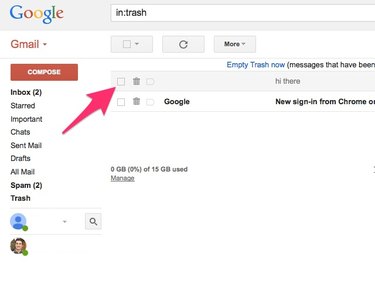
Locate the message or chat log you want to recover and click its check box.
Step 3
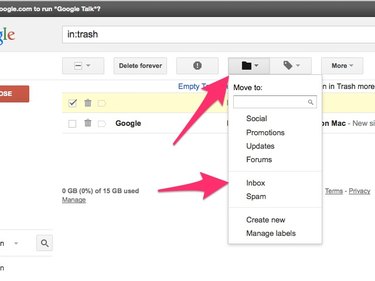
Click the Move To button and then select Inbox in the pop-up menu to restore the message to your inbox.
Going Off the Record in Gmail Chat
By default, Gmail saves a complete transcript of each of your chat sessions in a folder called Chats.
Video of the Day
You can disable it from logging a particular chat session through that session's Options menu.
Step 1
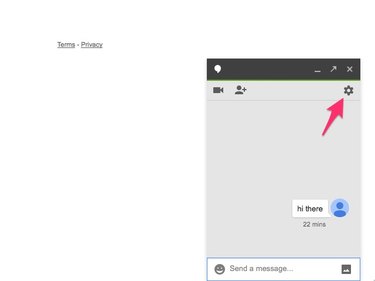
In a chat session, click the Options icon.
Step 2
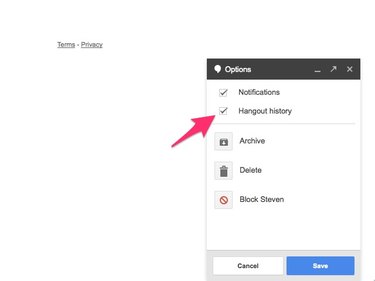
Within the Options menu, uncheck the Hangout History option to stop logging the session.
A message will appear in the chat window and the chat window of the person you're chatting with indicating that chat history logging has been disabled.