The most effective way to stop spam coming in to your Yahoo Mail account is to be careful how you use your email address and how you manage your messages. Prevention really is the best cure here. If you develop good habits, you will reduce the number of spam emails you receive. If you aren't so careful, spammers will spot that your email account is active and may target you even more. For example, you should:
- Share your email address sparingly: Think hard before you use your address to sign up to sites you don't know or trust. Try not to post your email on public sites such as forums and social networking sites. If you do need to put your address online, say if you run a website or blog, set up a secondary email address for that purpose. This minimizes the amount of spam coming in to your main email account.
- Don't communicate with spammers: Spam emails may look legitimate and may offer interesting links, deals or options to unsubscribe from their mailing lists. Don't click any of these links. If you do, spammers know that your account is active, and the number of spammy emails you receive will increase and not decrease.
Video of the Day
Video of the Day
Even if you practice safe emailing, you can't avoid spam entirely. If this becomes an issue, you can tweak your Yahoo Mail settings to stop the spam that's found you.
Use the Spam Button
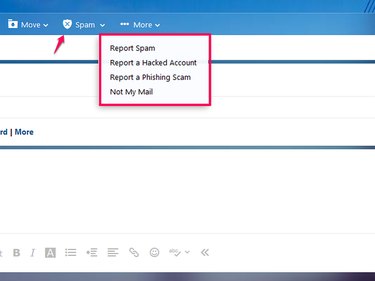
The easiest way to deal with a spam email is to tell Yahoo about it. Every mail message has a Spam button on its menu bar that you can use to transfer the message to your Spam folder. Most importantly, this transfer tells Yahoo that any future emails from this sender should go straight to Spam, so you won't see them in your Inbox.
Select the drop-down menu at the side of the Spam button to access other reporting options. For example, use this menu to report Phishing emails that try to collect personal data, messages that you think came from a contact's account that has been hacked or mail that was sent to you by mistake.
Block Spam Addresses
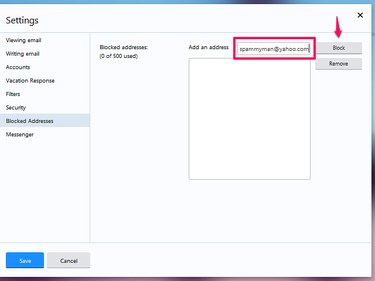
If you don't want to have to deal with a full Spam folder, block individual addresses instead. When you do this, Yahoo automatically deletes all emails from the sender before they get to your account.
Select the Settings gear wheel menu on your account page and click Settings. Go to Blocked Addresses and enter the email address you want to block in the Add an Address box. Select Block and then Save.
Block Email Images
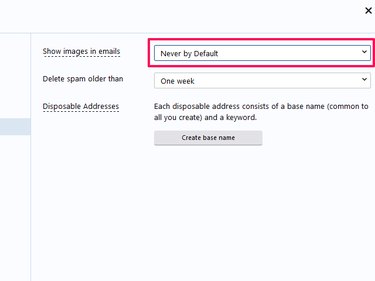
Even if you don't think you're interacting with a spam email, just looking at it may cause problems if it contains an image. Spammers can see when images download in your account. This tells them that your email address is active, and you may receive even more spam. To avoid this, you can change your settings to block image downloads.
Select the Settings gear wheel menu on your account page and click Settings. Select Security and make sure that the Show Images in Emails box is set to Never by Default. If you only want to block image downloads in messages in your Spam folder, switch to Always, Except in Spam Folder.
Set Spam Filters
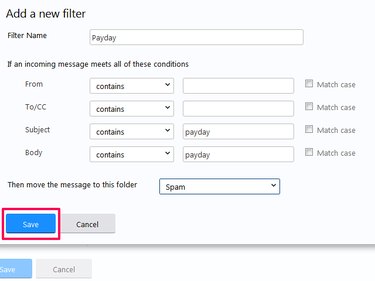
You can set filter commands in your account that tell Yahoo Mail where to store some unwanted emails. For example, you can use filters to automatically move emails to your Spam or Trash folders if they contain a specific word or phrase.
To access filters, go to the gear wheel Settings button and open Settings. Select Filters and then Add. Add your trigger word or phrase in the relevant boxes, name the filter, choose a location for the emails and select Save.