You can easily make Yahoo (or any web page) the home page any of your browsers using the browser's settings. Here's how to do that for Chrome, Firefox, and Internet Explorer.
Setting Chrome's home page
Step 1: Open your Chrome settings
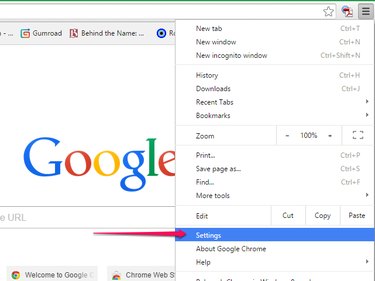
From Chrome's menu button, click Settings.
Video of the Day
Step 2: Choose your startup option
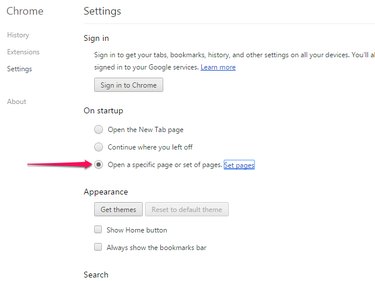
Within the On Startup section, select the option to Open a Specific Page or Set of Pages. Then click Set Pages.
Step 3: Select the startup page
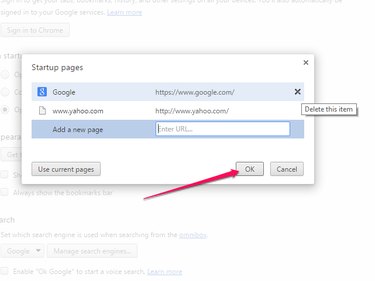
In the dialog box, enter www.yahoo.com in the Add a New Page field. If it's the only page you want to open automatically, be sure to click the X to remove other pages. Click OK.
If you want Yahoo to be just one of several pages that opens at startup, enter Yahoo as the first page and enter the other pages before you click OK.
Setting Firefox's home page
Step 1: Open your Firefox settings
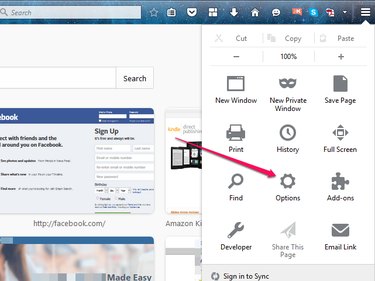
From Firefox's menu, select Options.
Step 2: Enter the startup page
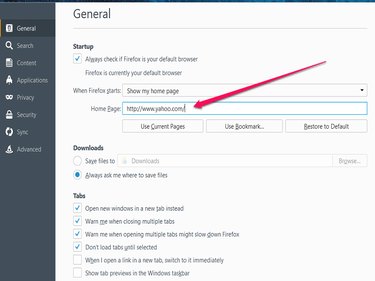
On the General menu under Startup, enter www.yahoo.com in the Home Page field. The new information is automatically saved to your settings.
Setting the Internet Explorer home page
Video of the Day
Step 1: Open your browser settings
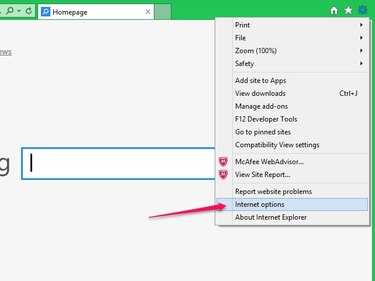
From the Settings menu, click Internet Options.
Step 2: Choose the startup page
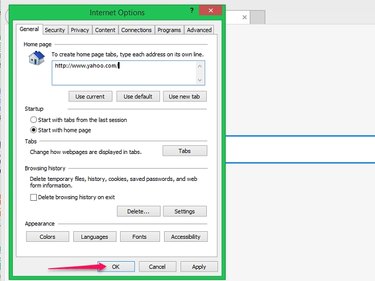
In the pop-up, enter www.yahoo.com in the Home Page field on the General tab. Click Apply and then click OK.