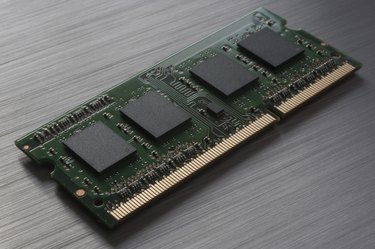
If your computer is crashing under heavy system load, you may want to check your RAM's voltage. Improperly configured RAM can overheat or cause system instability. Checking the component's voltage can identify a setup problem. Newer RAM generations have grown more efficient over time and continually require less voltage to run. According to PC Magazine, generations DDR, DDR2 and DDR3 have standard voltages around 1.8v, 1.5v and 1.05 to 1.2v respectively. RAM can operate at different voltages to adjust performance and stability. For example, DDR3 RAM can run as high as 1.65v.
Intel Extreme Tuning Utility
Video of the Day
The Intel Extreme Tuning Utility is an overclocking and diagnostics program available for computers that run Intel's CPUs. The utility, which operates inside Windows, lists system component voltages, including the memory voltage. You can check the RAM voltage by launching the program, opening the "Manual Tuning" tab, and checking for the "Memory Voltage" rating in the diagnostics window under the "Default" column. You can crash Windows and damage your computer's hardware by tampering with some of the settings, so if you don't know what it does you should avoid messing with it.
Video of the Day
AMD OverDrive
AMD OverDrive is an overclocking and diagnostics program available for computers running AMD CPUs. OverDrive lets you view and adjust hardware settings within the Windows environment. You can check your RAM's voltage within OverDrive by opening the "Clock/Voltage" tab located under the "Performance Control" and checking the "Current Voltage" value next to the "DDR Voltage" row in the voltage ratings area. The OverDrive tool gives you access to many system settings that if improperly adjusted can crash or damage the system. You should avoid applying changes unless you know what the adjusted features do.
SpeedFan
SpeedFan is a system voltage, temperature and fan speed monitoring tool for Windows. Since SpeedFan is designed to work with all CPUs, it may not clearly distinguish the RAM voltage from other voltages. To check your RAM voltage in SpeedFan, open the "Readings" tab and look through the voltage ratings for a value close to your RAM's suggested setting (between 1.05v and 1.8v). SpeedFan may list the RAM voltage next to a "Vcore" reading.
Boot to BIOS
Some computers will display the RAM voltage setting in BIOS/UEFI. Unlike the previously mentioned programs, checking the voltage in BIOS/UEFI runs outside of the operating system and can only be accessed from booting or restarting. Additionally, if the BIOS/UEFI lists the RAM voltage at all, its location can vary wildly between different motherboard modules. To find the value, if it is listed, search for the "CMOS," "Advanced" or "Configuration" menu and search through the sub-menus for the RAM voltage setting. For example, one BIOSTAR motherboard lists the value under the "CMOS/T-Series/OverClock Navigator/Voltage Configuration" menu destination.
- PC Magazine Encyclopedia: Definition of: Dynamic RAM
- PC Magazine: DDR vs. DDR2 vs. DDR3: Types of RAM Explained
- G.Skill FAQs: Memory
- Intel: Intel Extreme Tuning Utility (Intel XTU)
- AMD: AMD Overdrive
- Almico: SpeedFan
- BIOSTAR FAQ: How to Set DDR2 to 1066 MHz for My Memory on TA790GX 128M?
- Intel: Download Center
- AMD: AMD OverDrive
- Almico: SpeedFan 4.49
- Toshiba Knowledge Base: How To: Enter the System BIOS or UEFI in Windows 8