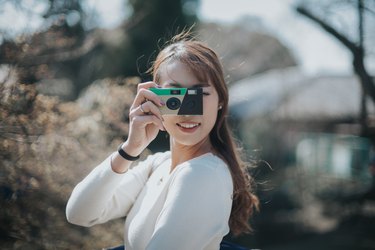
A disposable camera, also referred to as a single-use camera, is one that's meant to be used for a single roll of film. Although this type of camera has the same basic parts as other film-based cameras, including a shutter and lens, the disposable camera housing is discarded when the film is processed. Disposable cameras also have a simplified interface and fewer features compared to reusable cameras.
How a Disposable Camera Operates
Video of the Day
A disposable or single-use camera is sold with a roll of film already loaded. The user manually advances the film by winding a gear at the top of the camera each time a picture is taken. To take a picture, the user looks through a viewfinder and then presses a button that opens the shutter and allows light in through the lens to capture an image on the camera's film. With most disposable cameras, there is no auto-wind feature, and the film must be advanced by winding before another picture can be taken.
Video of the Day
Some disposable cameras are equipped with a flash. Unlike advanced cameras, the flash on a disposable camera can't detect whether it's needed based on lighting conditions. Instead, you turn on the flash manually before taking a picture. It always flashes when it is turned on, regardless of available light.
Using a Disposable Digital Camera
Digital disposable cameras have been available in the U.S. since the early 2000s, though they are not used as widely as film-based versions. They offer some of the benefits of digital cameras, such as an LCD screen where you can review and delete photos and a built-in automatic flash. The downside is that you still have to take a disposable digital camera to a film processor for prints or a DVD with digital versions of your pictures.
There is no way to download the images to a computer or other device directly. Although disposable digital cameras are relatively inexpensive, you may be able to find an inexpensive reusable digital camera for nearly the same price. Then you won't require the services of a film processor to download your photos from the camera.
Disposable Camera Development
A disposable camera similar to those in use now was first introduced by Fujifilm in the mid-1980s with the goal of making it easy for anyone to take pictures. The Fujifilm Quick Snap camera sold more than a million units in its first year. The Quick Snap's popularity was due in large part to its use of 35 mm film compared to Kodak's Fling camera, which used 110 mm film. After switching over to 35 mm, the Fling was renamed the Kodak Fun Saver. Since then, disposable cameras have continued to evolve while retaining popularity despite the emergence of digital image technology.
Popularity of Disposable Cameras
Even though most of us have access to phone cameras that take high-resolution photos and videos, disposable cameras have hung on to some of their popularity. Many people have nostalgic feelings about these simple cameras, associating them with what seems like a simpler time. People also like the surprises that come with having to wait for the film to be developed to see printed photos rather than the instant gratification a digital camera provides.
The practicality of disposable cameras makes them popular for special events like weddings, where they are left on guest tables with instructions for guests to take pictures and leave the cameras for the host to develop. They're also a good option for beach vacations, camping trips, or anytime you don't want to worry about protecting an expensive phone or camera. Because they're mechanical or battery-operated, you don't need to worry about finding a way to keep them charged.