


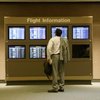


If you’re getting ready to fly Southwest, you can check the status of your flight for delays or other travel glitches right from the Southwest website. During busy travel times, around holidays particularly, you can create flight status notifications sent to your phone or email address to stay up-to-date on any travel changes, including flight cancellations.
Step 1
Go to Southwest.com. From the home page, look under "Quick Air Links" in the upper right column, or click on "Air" in the top banner of the page to populate a list of options, including "Check Flight Status."
Step 2
Click on "Check Flight Status" within 24 hours of your flight from the "Quick Air Links" or options under "Air." Enter flight information: Departure city and arrival city, travel date and flight number. Hit "Enter" to open another window, showing flight status.
Step 3
Find your flight number on the itinerary you received when you booked the flight. Typically, the flight number is under the confirmation number.
Step 4
Create flight status alerts sent to your email or cell phone. Go to Southwest’s home page within 24 hours of your flight. Click on the "Air" icon at the top of the page. Choose "Create Flight Status Notification." Input departure city, arrival city, travel date and flight number. Enter your email or cell phone number on the next page to receive flight status notifications.
Tip
- Call 800-435-9792 to speak with a customer service representative in English or 800-826-6667 to speak to a Spanish-speaking representative if you cannot check your flight online. Have your flight information or credit card number you used to reserve the flight ready before you call.
Photo Credits
- Thomas Northcut/Photodisc/Getty Images