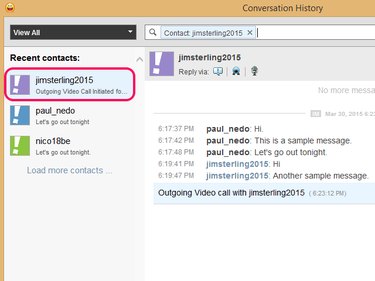
You can view all past interactions and conversations you had with your Messenger friends by opening the Contacts menu and selecting Conversation History in Yahoo Messenger 11.5 under Windows 7 or 8.1. To help you navigate through your chat logs, Messenger provides you with search tools, such as a search engine and a filter.
Step 1
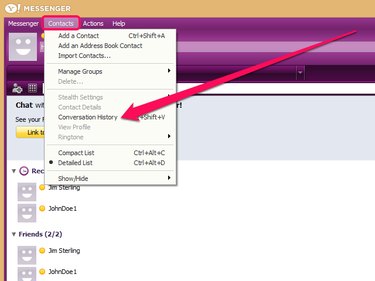
Log in to Yahoo Messenger, open the Contacts menu and select Conversation History to open a pop-up containing your archived conversations.
Video of the Day
Step 2
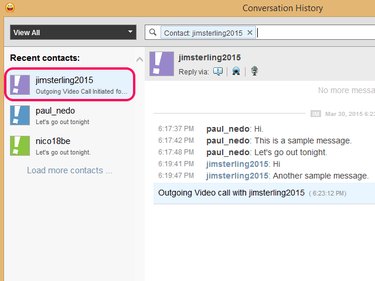
Select the name of a contact from the sidebar to display your past conversations and other interactions -- video or voice calls, for example -- with that person.
Step 3
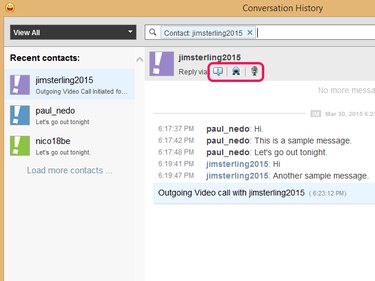
Send a message or initiate a video or phone call from the Conversation History window by clicking on the Instant Message, Video Call or Voice Call icons.
Step 4
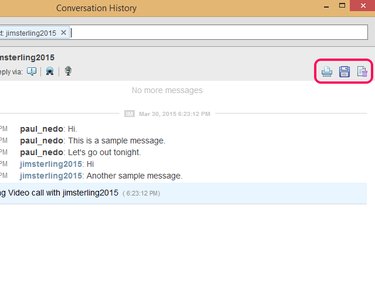
Save a hard copy or print your conversation history with the selected contact by clicking on the Print or Save icon. Alternatively, delete your entire conversation history with that contact from the Yahoo servers by clicking on the Delete Entire History icon.
Step 5
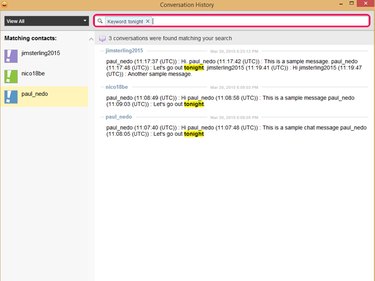
Type a keyword or phrase in the search bar and press the Enter key to search your conversation history. Yahoo Messenger then displays a list of conversations that contain the specified keyword or phrase.
Step 6
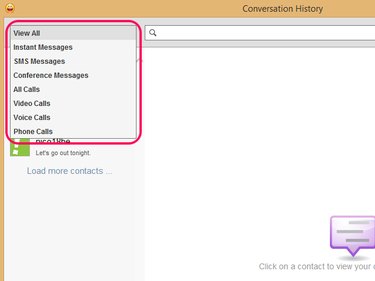
Filter your conversation history to display only relevant interactions by opening the drop-down menu and selecting an interaction type. For example, select Voice Calls to display only the voice calls log.
Video of the Day