How to Calculate Absolute Granulocyte Count
Granulocytes, also called neutrophils or polys, are the most common type of white blood cell. White blood cells kill bacteria, fungus or viruses that may enter the body. Other types of white blood cells include lymphocytes, basophils, eosinophils and monocytes. Granulocytes and young granulocytes (called band cells) mostly attack bacteria. Knowing the absolute granuloyte count is helpful for people with health conditions that might impair their ability to fight off infection.
Find the number that is printed next to granulocytes (or neutrophils or polys). Write that down. If this number is written as a percent, move the decimal point two spaces to the left. For example, if the number next to granulocytes is 45 percent, change it to 0.45.
How to Figure Out How Much Percentage of Body Fat to Lose
Learn More
If there are band neutrophils, find and write that number underneath. Move the decimal point if it is a percent. For example, if the number is 7 percent, change it to 0.07.
Add them together. For example, 0.45 plus 0.07 equals 0.52
How to Calculate a Left Shift
Learn More
Find the number of white blood cells. This is usually called WBC on a lab sheet, with the units written as thousands per cubic milliliter (K/uL) or thousands/mm3. Move the decimal three places to the right. For example, if the WBC is 6.5/mm3, change it to 6,500.
Multiply the total number from adding granulocytes and band cells by the white blood cell number. The result is the absolute granulocyte count. For example, 6,500 times 0.52 equals 3,380.
Tips
Most people normally have an absolute granulocyte count between 2,500 and 6,000. If the granulocyte count is 1,000 or less, there is increased risk of infection. If it is below 500, the risk of infection is more serious. This is called neutropenia. If a person who has neutropenia gets an infection or develops fever, she should contact her doctor or healthcare professional as soon as possible in order to get appropriate antibiotics or other treatments.
Related Articles
How to Figure Out How Much Percentage of Body Fat to Lose
Learn More
How to Calculate a Left Shift
Learn More
How to Determine Walking Speed
Learn More
Absolute Eosinophils Levels
Learn More

How Much Should a Man Weigh?
Learn More
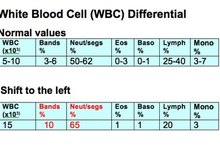
What Is a Shift to the Left in Blood Testing?
Learn More

How to Calculate Weight Watchers Points
Learn More

Steps to Miles Conversion for a Pedometer
Learn More

The Differences Between Contact Lens Base Curve 8.6 & 8.9
Learn More

What Is the Formula for Calculating Blood Pressure?
Learn More
References
Resources
Writer Bio
Alithea Crawford is a medical doctor with more than 20 years of experience in primary care. Her writing includes articles, board-type test questions for Exam Master and lecture summaries for continuing medical education. Crawford holds a B.A. in biology from Cornell University, as well as an M.D. from the Medicine University of Cincinnati, College of Medicine.