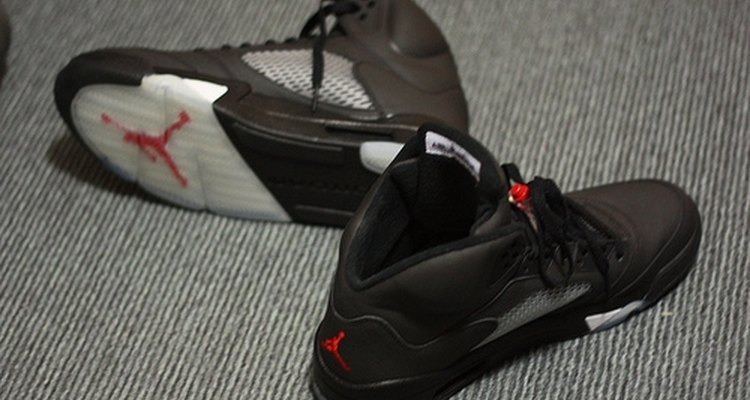
Air Jordan shoes refer to the line of sneakers created for and endorsed by basketball superstar Michael Jordan. The line of shoes was first made available to the public in 1985 and new designs continue to be produced for sale today (as of 2009) despite Michael Jordan's retirement from the game of basketball in 2003.
History
In the winter of 1984, Nike had little credibility in the basketball world. While competing companies such as Adidas and Converse had signed high-profile basketball stars to endorse their shoes, Nike lacked such a marketing tool. In an effort to change this, Nike persuaded Michael Jordan, then a 21-year-old rookie with the Chicago Bulls, to sign a five-year $2.5 million contract which would include his own line of shoes.
Types
The first Air Jordan's were designed by Peter Moore. Moore designed the shoes to match the uniform of the Chicago Bulls (red and black). However, Moore did not realize that at the time the National Basketball Association required all players to wear white sneakers. Jordan wore the shoes despite the requirement and the subsequent fines he was forced to pay only helped to market the shoes.
The Air Jordan's were unique in that Nike released new designs annually. As of 2009, new designs continue to be released by Jordan Brand, a subdivision of Nike. While the designs vary, the distinct "Jumpman" logo is often incorporated in some manner.
Significance
The original Air Jordans made Nike $2.3 million within the first two months of being available to the public. Today, Nike is one of the leaders in basketball shoes thanks in large part to the success of the Air Jordans. Moreover, the risky decision that Nike made in 1984 to invest such a significant amount of money in a single athlete has since become the norm. Now the most popular athletes in almost all sports have their own line of shoes.
Controversy
The high cost of Air Jordan's combined with their popularity led to several well-publicized muggings and murders over the shoes in the late 1980s and early 1990s, primarily among inner-city youths. The violence led Sports Illustrated to feature the cover story "Your Sneakers or Your Life" in 1990. According to a May 1990 article in the New York Times, Spike Lee, a film director who directed and also appeared in several commercials for Air Jordan shoes, blamed the problem on ''the breakdown of the family structure" rather than on the sneakers or the people who endorsed them.
Warning
Counterfeiting Air Jordan sneakers is popular all around the world. The best way to ensure that you are purchasing an authentic pair of Air Jordan's is to purchase them directly from a retail store, which you can locate by clicking on the "Jordan Brand Retail Store Locator" link below.
Related Articles
The History of Converse Shoes

The Difference Between Nike Dunks & AF1

History & Background of Nike

What Companies Does Nike Own?
History of Fila Shoes
The History of Steel Toe Boots

Ways to Lace Hyperdunks
What Is the Meaning Behind the Converse ...

The First Converse Shoe

What Is the Difference Between Nike Air ...
How to Clean Marks From Nike Mercurial ...
Interesting Facts About Vans Shoes

The History of Skechers Shoes

Types of Nike Shoes
Christian Dior's Contributions to ...

Difference Between Vans Era & Authentic ...
How to Clean Retro 11 Jordans
Croton Watches History
How to Submit Shoe Designs to Nike
How to Dress Like Run-DMC
References
Writer Bio
Thomas King is a graduate of the University of Pittsburgh School of Law where he served as managing editor of the "Pittsburgh Journal of Environmental and Public Health Law." He currently lives in Aberdeen, Washington where he writes and practices law.
Photo Credits
chrishimself: creativecommons.org