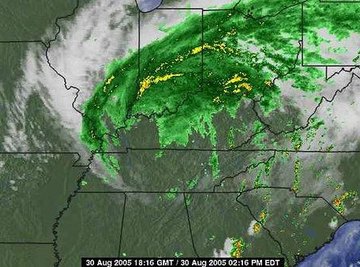
Weather radar, also referred to as Doppler radar, is a useful tool in forecasting weather. It is also useful to the typical person because it can let them know if and when bad weather will affect them. Forecasters use radar to determine when to issue weather watches and warnings, and storm chasers use it to decide where to go to gather data on large thunderstorms. Despite being an advanced technology, it is very simple to read a radar screen.
Access a radar map by logging on to a weather Web site or watching a weather broadcast, and locate your city on the map.
Read the key, usually at the top of the map, to determine what the radar colors mean. Usually, yellows and reds are more intense precipitation, while greens are less intense.
Determine the direction that the storm is heading by viewing the radar in motion, which shows slides of the past several radar frames. Look at the direction in which the storm was moving in previous frames, and trace in that direction to determine where the storm is heading.
Check the time stamp, usually on the bottom of the screen, to see what time each frame was taken. This will help you determine how fast the storm is moving and to estimate how long it will take to move from one area to another.
References
About the Author
Kaitlyn Yeager is a newspaper web producer Connecticut and has been working in journalism since 2006. She graduated with a Bachelor of Arts in journalism in 2009. Yeager enjoys sharing information about knitting and crocheting, her two main hobbies.
Photo Credits
Andy Zeigert