In business, gross profit, gross margin and gross profit margin all mean the same thing. It's the amount of money you make when you subtract the cost of a product from the sales price. When dealing with dollars, gross profit margin is also the same as markup. It's only when you calculate percentages that profit and markup become different concepts.
Gross Profit Vs. Net Profit
Video of the Day
Gross profit is almost always calculated by subtracting what you paid for an item from the price you sold it for, and nothing else. For example, if you ran a fruit stand, the cost of an apple is what you paid the wholesaler, and the sales price is what your customer paid you. Your cart rental, transportation costs, licenses and advertising expenses aren't used to calculate gross profit -- that's used for calculating net profit.
Video of the Day
Single Unit Cost Vs. Total Costs
Gross profit is calculated the same way, whether you're calculating the cost of a single item or hundreds of thousands of items.
If you want to calculate gross profit on multiple items, then you should first add the costs and sales prices in a basic spreadsheet. If you have a complex sales system with different lines of goods or different departments, you may want to calculate the gross profit for each department and the organization as a whole. In this case, a spreadsheet with totals and subtotals will give you the costs and sales figures you need.
Gross Margin as a Dollar Amount
Gross margin, or gross profit, is calculated the same, whether you're looking at the profit of a single item or everything you've sold in a year.
Step 1
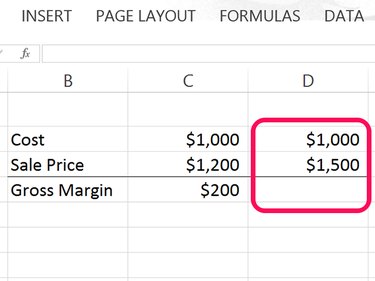
Type the total cost of an item or multiple items in any cell in an Excel worksheet. Type the selling price of that item directly below the cost.
Step 2
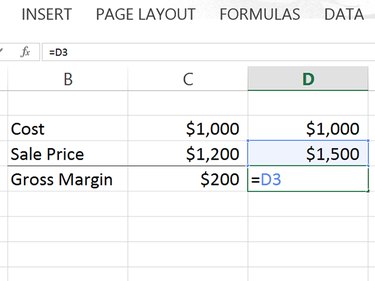
Click any cell below the selling price. Type an = (equal sign) to begin the Excel formula. Click the selling price to add that cell to the formula.
Step 3
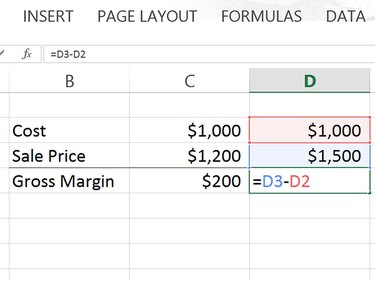
Type a - (minus sign) and then click the cell containing the cost.
Step 4
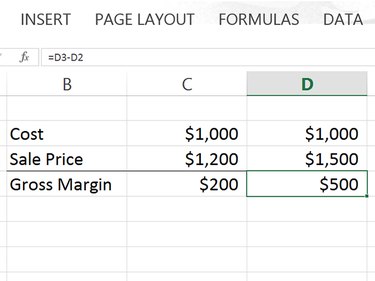
Press Enter to complete the formula. Excel automatically calculates the gross margin. Note that whenever you click on the cell containing the formula, the formula also appears in the Formula field above the worksheet.
Gross Margin Vs Markup As Percentages
Margin and markup are the same thing when calculating them as dollar figures. However, when calculated as percentages, they are quite different. Markup is calculated by dividing the gross profit by the cost. Margin is calculated by dividing the gross margin by the sales price.
Step 1: Calculate Gross Margin as a Dollar Amount
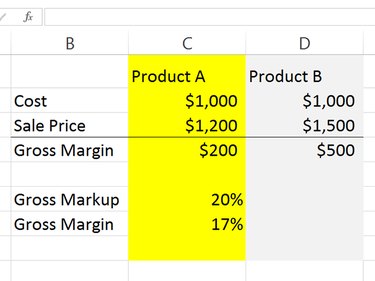
Return to the worksheet where you calculated gross margin as a dollar amount. Add two new rows at the bottom, the first for Gross Markup and the second for Gross Margin. In the screenshot above, we've already calculated the percentages for Product A to illustrate that markup is always a higher percentage than margin.
Step 2: Calculate Gross Markup as a Percentage
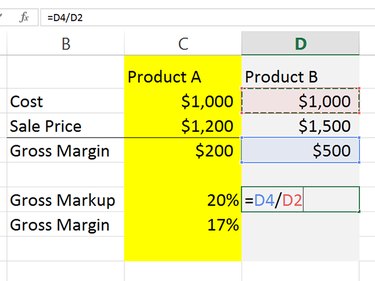
Click the cell that will display the gross markup and divide the margin by the cost. Type an =, then click the Margin cell, type a / as a division sign and then click the Cost cell. In the example here, the formula is: =D4/D2. Press Enter to calculate the formula. In this example, it's 50 percent.
Step 3: Calculate Gross Margin as a Percentage
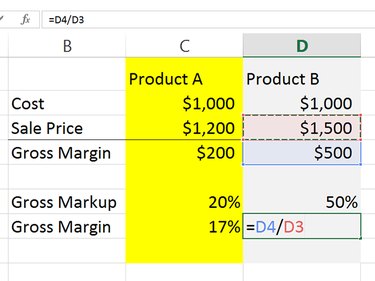
Select the cell that will display the gross margin and divide the margin by the sale price. Type an =, then click the Margin Cell, type a / and then click the Sale Price Cell. In the example here, the formula is: =D4/D3. Press Enter to calculate the formula. In this example, the percentage is 33 percent.