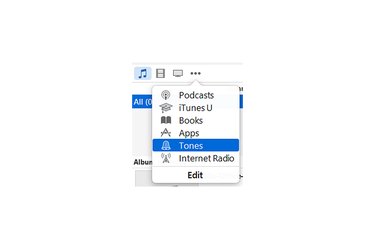
Even though the iPhone can play music in several audio formats, it only recognizes one file type as ringtones: M4R. Despite the unique extension, M4R files are actually AAC audio files -- the same as songs purchased from the iTunes Store. ITunes 12 doesn't include a one-step method for creating your own ringtones, but by converting other audio files into AAC audio and changing the file extension, you can sync any catchy audio clip for use as a ringtone, even if it originates as a WAV or MP3 file.
Step 1
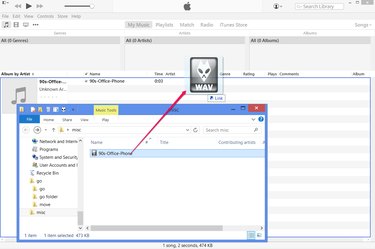
Drag a WAV file or other audio file into iTunes to add it to your music library. At this point, the file appears on the Music tab rather than the Tones tab, preventing you from using it as a ringtone.
Video of the Day
Step 2
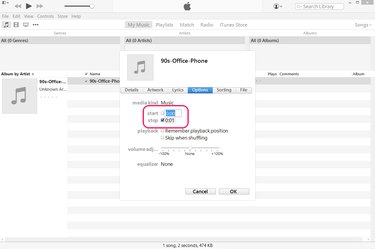
Select the file in iTunes and press "Ctrl-I" -- or right-click it and choose "Get Info" -- and open the "Options" tab. Adjust the "Start" and "Stop" times to select the portion of a song to use as your ringtone. If the audio file is already a short clip, skip this step.
Step 3
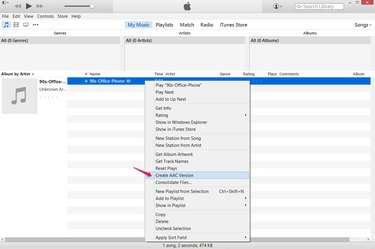
Right-click the file in iTunes and choose "Create AAC Version" to make an AAC -- Advanced Audio Coding -- copy of the file. iTunes won't yet recognize the copy as a ringtone because it has the wrong file extension. By default, AAC audio files have the extension M4A, rather than the ringtone extension M4R.
Step 4
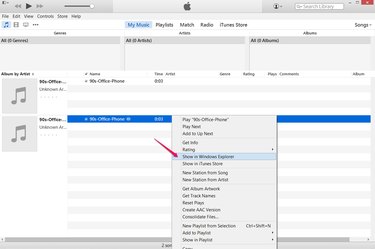
Right-click the new file in iTunes and choose "Show in Windows Explorer" to open the folder containing the AAC copy.
Step 5
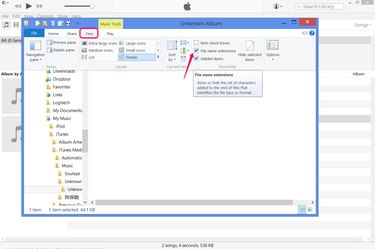
Open the "View" tab and check "File Name Extensions" to enable viewing and modifying file extensions on Windows 8. Or, on Windows 7, press "Organize," choose "Folder and Search Options," open the "View" tab and uncheck "Hide Extensions for Known File Types."
After you finish making your ringtone, reverse this option if you want to re-hide file extensions.
Step 6
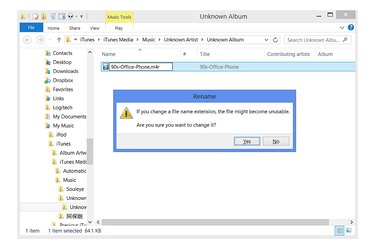
Click the file's name once to rename it. Change the extension from "M4A" to "M4R" (case insensitive) and press "Enter" to turn the file into a ringtone. When Windows warns you about the risk of changing a file's extension, click "Yes."
Step 7
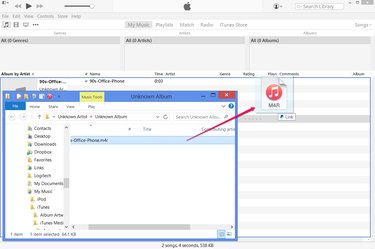
Drag the newly renamed M4R file back into iTunes to add it to the library as an iPhone ringtone. You can now delete the two copies of the audio file that appear on the Music tab of the library.
Video of the Day