Who doesn't love texting? It's a quick, easy way to instantly communicate with just about anyone who has a phone. But if you don't have an unlimited texting plan, those rapid-fire SMS exchanges add up fast. Luckily, there's a way to text people for free: Email.
Texts are basically just email messages (albeit on a different network--texts are sent via a wireless carrier's network, while emails are sent via data), and so it's easy to send and receive text messages using your email address. Here's how to do it.
Video of the Day
Video of the Day
Send a text message via email
To send someone a text message via email, you'll need to know two things:
- Their 10-digit phone number
- Their wireless provider
The email address you'll use will be their 10-digit phone number "at" their wireless provider's texting domain name. You should be able to find the texting domain name on the wireless provider's website. Here are some of the most popular providers' texting domain names:
- AT&T: [number]@txt.att.net
- Sprint: [number]@messaging.sprintpcs.com or
[number]@pm.sprint.com
- T-Mobile:
[number]@tmomail.net
- Verizon: [number]@vtext.com
- Boost Mobile: [number]@myboostmobile.com
- Cricket: [number]@sms.mycricket.com
- Metro PCS:
[number]@mymetropcs.com
- Tracfone:
[number]@mmst5.tracfone.com
- U.S. Cellular:
[number]@email.uscc.net
- Virgin Mobile: [number]@vmobl.com
Substitute your recipient's 10-digit phone number--no dashes or dots--for [number]. For example, if your recipient's number is 818-555-2233 and their provider is Verizon, their texting email address will be 8185552233@vtext.com.
Compose your text in the email program or service of your choice. Put their texting email address in the To: field and put your message in the message body. You'll want to keep your message under 160 characters--this includes email signatures--but you can enter a subject in the subject line that will not count toward the 160 characters.
Send a text message to an email address
Likewise, sending a text message to someone's email address is easy. All you need to do is open your texting app and type your recipient's email address into the To: field (where you would normally type a phone number or a contact's name).
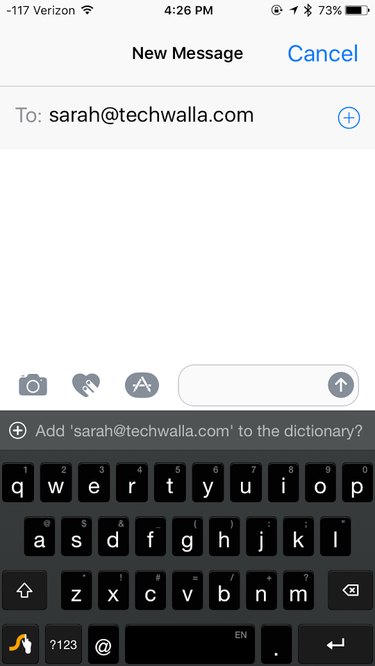
If you're using an iPhone and you have iMessages turned on, sending a text message to someone's email address may send it to their iMessage account instead (which will show up as an iMessage, not a text). To make sure it sends as a text, open the Settings app and go to Messages > iMessage and turn iMessage off.