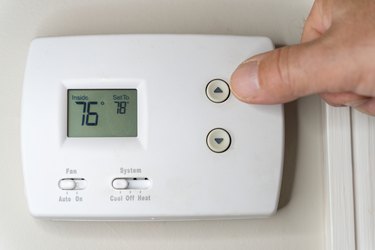
If you don't know how to use a Honeywell thermostat, you might have trouble staying comfortable because it's the climate-control center for your house. Depending on the nature of your home's HVAC system and your heating and cooling needs, you could have — in order of increasing complexity — a mechanical thermostat that operates a single-stage heating or cooling system, a digital nonprogrammable or digital programmable thermostat, or a smart thermostat that connects to Wi-Fi. Functionality increases with complexity and so does the learning curve, so your journey to master your home's climate control starts with determining what type of thermostat you have.
What Type of Honeywell Thermostat Do I Have?
Video of the Day
Every Honeywell thermostat contains a temperature sensor and at least one switch that sends a low-voltage signal to the HVAC system transformer. Digital models have more functions than mechanical ones, and smart models have even more. Here's how to identify the type you have.
Video of the Day
Mechanical or Round Honeywell Thermostats
A mechanical thermostat isn't programmable, and although not all are round like the Honeywell CT87N1001, that shape makes the unit slightly easier to use. On the upper left, there is usually a System switch that allows you to set the thermostat to Heat, Cool, or Off. On the upper right is a Fan switch that you can set to Auto or On. When the fan is set to Auto, it operates only when the heating or air conditioning comes on; when the fan is set to On, it runs continuously on its own.
To set the thermostat, simply turn the dial clockwise to raise the temperature setting or counterclockwise to lower the temperature. If the unit is rectangular, like the Honeywell CT53K1006, the dial is often replaced by a lever.
Digital Nonprogrammable Honeywell Thermostats
A digital nonprogrammable thermostat, like the Honeywell 5000, is a small step up from a mechanical model with the main difference being that it has an easy-to-read LED screen that displays the temperature and system settings. If you want to raise or lower the temperature, you have to do it manually using the up and down buttons on the side of the unit. The only other controls are a button for selecting heating or cooling and a fan button for setting the fan to On, Off, or Auto.
Programmable Honeywell Thermostats
Functionality takes a giant leap with a digital programmable thermostat, like the Honeywell Home RTH221B1039. Many of these look more or less like a nonprogrammable digital model, complete with a fan switch and a switch for selecting heating or cooling, but they have extra buttons for programming the heating/cooling system to come on at certain times of the day.
The extras may be physical buttons next to the LED screen, or they may be displayed on the screen as they are on the Honeywell Home RTH7600D. Button functions vary, but there's usually a Set button to set the program, a Hold button to temporarily override the program, and a Run button to return to the program after you've used the Hold button to override it.
Smart Honeywell Thermostats
At the apex of functionality, a smart digital thermostat, such as the Honeywell Lyric, can connect to a mobile device or a home assistant, like Amazon Alexa. It typically has a large LED touchscreen and can be programmed directly or remotely to control multiple HVAC units, including a furnace, an air conditioner, or a reversible heat pump. Characteristics of the different thermostat models vary, so it's important to become familiar with the user manual for the model you own.
How to Set the Date and Time on a Honeywell Thermostat
If you have a programmable thermostat or a smart thermostat, you have to set the time and day if you want to be able to program it. For most units, you can use the following procedure:
- Locate the Set Clock/Day button and press it; the time will appear on the display. Press and hold the Ahead or Back button until the correct time appears. Note if it is a.m. or p.m. and continue holding down the button if necessary until the time is correct.
- Press the Set Clock/Day button again; the day of the week will appear on the display. Press Ahead or Back and hold down the button until you reach the correct day.
- Press the Run Program button once to set the time and date. If you have a Wi-Fi thermostat, such as a Lyric T5 or VisionPro model, it will automatically adjust settings for daylight savings time. On non-Wi-Fi-enabled models, you'll have to remember to change the time setting manually when you set your clocks back or forward.
Honeywell Thermostat Program Settings
If you have a nonprogrammable thermostat, you'll be able to choose the room temperature, and the thermostat will cycle the heating/cooling system on and off to maintain it, but that's about it. If you want a new temperature, you have to set it manually. A programmable thermostat, on the other hand, automatically adjusts temperature settings according to the program, which gives it more capabilities to help you use your heating/cooling system more efficiently and reduce your energy costs.
Programmable thermostats can change the temperature several times a day. You can program a warm temperature for times of the day when you most need heat and a cooler one for times when you're sleeping or out of the house. A seven-day programmable thermostat allows you to create a program schedule for each day of the week, and a five-two-day programmable thermostat allows you to program a schedule for each day of the week and a separate schedule for the weekend. If you have a Wi-Fi thermostat, you can change the program settings from your laptop or mobile device using a Honeywell app.
In addition to being programmable and Wi-Fi enabled, a smart thermostat can learn your behavior patterns and make automatic adjustments. For example, a smart thermostat can monitor your phone, and when it detects you've been out of the house for more than 30 minutes, it can automatically turn down the furnace or air conditioner. Smart thermostats also help you realize energy savings by monitoring and analyzing your energy usage. You can control your smart thermostat through the Honeywell Home app, and you can also connect it to a home assistant and control it with your voice.
How to Reset a Honeywell Thermostat
All programmable devices, including laptops and Wi-Fi routers, get corrupted after an extended period of continuous use and need to be rebooted or reset. You can tell your Honeywell thermostat has reached this point when it fails to hold program settings and maintain the desired temperature. Over the long term, you may notice this in higher-than-normal energy bills.
The actual reset procedure varies by model number, but here's a simple general procedure that works for most models with batteries:
- Turn off the thermostat and remove it from the wall plate. You can usually just unsnap it, but if it has screws, remove those first.
- Open the battery compartment, remove the batteries, reverse them so the negative poles are in the positive position and vice versa, and then put them back in.
- Leave the batteries for five to 10 seconds and then remove them and put them back in the proper orientation.
- Replace the thermostat onto the wall plate and turn it on. The thermostat will have reverted to its factory settings, so you'll have to reprogram it.
If you have a smart model with a touchscreen, you can usually find the reset function by touching the Menu button, scrolling to the Preferences menu, and selecting Restore Factory Defaults from that menu. You can also do this using the Honeywell Smart Home app on your laptop or mobile device.
Slightly different procedures apply to Honeywell thermostats in the 4000 through 9000 series. If you aren't sure, consult the instruction manual for your model, available online at the Honeywell International website.
- 4000 series: Turn on the thermostat, press the Program button three times, and then insert a wire into the hole to the right of the buttons and hold it there for two to five seconds.
- 6000 series: Simultaneously press the Fan button and the up button and hold them for five to 10 seconds. Release these buttons, then press the next one to the right until you see 39 displayed on the screen. Use the down button to bring this number to zero.
- 7000 series: Use the battery replacement trick described in the steps above.
- 8000 series: Click the system button and hold the center button until Reset to Factory Settings appears on the screen. Select that option.
- 9000 series: Using the selection buttons on the screen, follow this sequence: Menu > Preferences > Restore to Factory Default > Yes.
How to Unlock a Honeywell Thermostat
Honeywell programmable thermostats have a lock feature that homeowners can engage to prevent kids, tenants, or other unauthorized people from changing the thermostat settings. If the thermostat is locked, you have to unlock it if you want to make certain changes to the system settings. The procedure varies according to model, so it's always a good idea to consult your owner's manual.
- Honeywell Pro Series T4: Press Unlock on the screen and enter a four-digit PIN on the prompt. If you haven't set one up, the default is 1234. Use the +/- keys to scroll to each digit, and use the Select key to advance to the next digit. Once you've entered the PIN, the thermostat is unlocked.
- Honeywell Pro Series T6: Except for determining the PIN, the procedure is the same as for the T4. To determine the PIN, remove the front of the thermostat, look for a four-digit number in the top right corner, and add 1234 to that number.
- 8000 Series: Press and hold System and Auto together until a blank space appears on the screen. Press this space until four digits appear on the left side. Use the up and down arrows to change this number to 0670. After entering this PIN, change the number that appears on the right to zero using the up and down buttons to unlock the unit.
Honeywell Thermostat Troubleshooting
Many Honeywell thermostat problems are model-specific, so the first thing to do is consult the troubleshooting guide for your model on Honeywell's website. That said, a few common problems have general solutions.
Display Screen Is Blank
Check the circuit breaker for the system and reset it if it has tripped. If the thermostat has batteries, replace them. If the screen is still blank, look for problems in the HVAC system. For example, if there's an open door on the furnace or air handler, a safety switch will prevent the system from engaging.
Thermostat Won't Turn On the Heat
Check the circuit breaker and reset it if necessary. Then, check the thermostat screen and replace the batteries if it's blank. Check the level of the thermostat and re-level it if necessary; many thermostats won't work properly when tilting to one side or the other. It's also a good idea to remove the cover plate and check the wiring. If any wires are loose, turn off the breaker, reconnect them to the appropriate terminals, and turn the breaker back on.
Thermostat Doesn't Maintain Temperature
You can override thermostat settings on programmable models by scrolling to a new setting and pressing the Hold button. The settings will revert to the programmed ones after about 12 hours, however. You can make the change permanent by using the Permanent Hold function. The procedure for doing this varies by model.
House Is Chronically Too Hot or Too Cold
Sometimes, the environment around the thermostat doesn't match the conditions in the rest of the room. Look for obstructions blocking airflow around the thermostat; sources of heat, such as direct sunlight or a nearby heat register; or sources of cold air, such as an open window or door.