



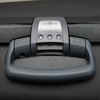
Many Samsonite suitcases come with a combination lock built into the body of the luggage. These locks are ideal because they won't get stuck in a luggage conveyer belt or tear off, damaging your luggage. Use the same procedure to set the lock to your own combination the first time or to reset it in the future.
Set the combination lock to 0-0-0 if the suitcase is fresh from the factory; otherwise, set the dials to your current combination.
Open the lock.
Locate the button, tab or lever on the lock. Move the tab, twist the lever or use a ballpoint pen to push in the button. On some locks, you must use the pen to hold in the button while you complete the rest of the steps.
Set the lock dials to the desired combination.
Return the tab or lever to the original position or release the button. If you didn't have to keep the button pressed in, there is a larger button you press to release the smaller button and finish setting the lock.
Tip
Safeguard your luggage combination because if you lose it, the only way to reset the combination is by taking your suitcase to an authorized Samsonite repair center.
If there's a red rhombus and a keyhole insignia on your combination lock, it is TSA-approved. That means if the TSA needs to inspect your luggage, it can use a master key to open the lock as opposed to cutting it off.
Photo Credits
- Maxal Tamor/iStock/Getty Images