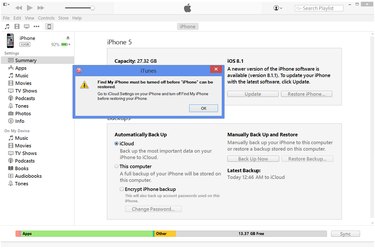
Reinstalling iOS on an iPhone, either by restoring through iTunes or by resetting the system in the Settings app on iOS 7 or 8, returns the phone to factory conditions. This process cleans your personal data, making the phone safe to sell, and resets all settings, solving most glitches and bugs. If your phone won't turn on at all, preventing normal methods of restoration, place the iPhone in recovery mode to force a reinstall through iTunes.
Turn Off Find My iPhone
Video of the Day
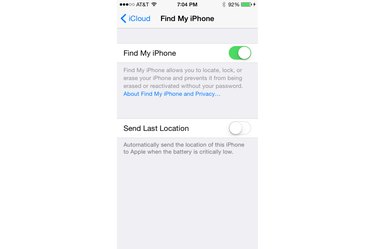
As a security precaution, you can't restore the system on an iPhone that has Find My iPhone enabled. Because disabling Find My iPhone requires your Apple ID password, this step prevents a thief from taking your phone and restoring it to get around needing your phone's code. To turn off Find My iPhone, open the Settings app, tap "iCloud," "Find My iPhone" and switch the option off. In the case of a malfunctioning phone that won't boot up, you can remove the device from Find My iPhone on the iCloud website by logging into your Apple account.
Video of the Day
Restore Using iTunes
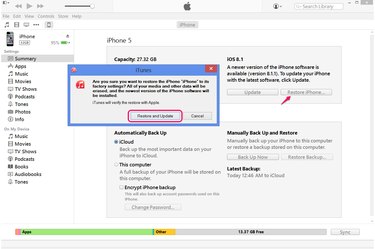
Connect your iPhone to your computer and click the iPhone icon in iTunes. Check the time of the latest backup listed on the Summary tab. If the phone hasn't been backed up in the last day, either click "Back Up Now" to save a backup to iTunes or start a manual iCloud backup from the iCloud page of the phone's Settings app. When you're ready to erase your phone and reinstall the system, click "Restore iPhone" and then press "Restore" on the confirmation dialog box. If a newer version of iOS is available for your phone, the confirmation button reads "Restore and Update," and causes iTunes to update your phone to the newest version during reinstallation.
Restore Using Recovery Mode
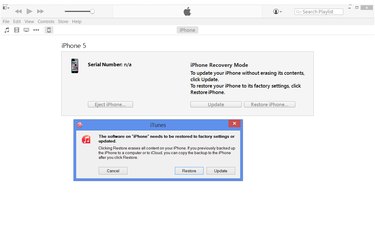
If iTunes won't recognize your iPhone or if the phone won't turn on successfully, turn the phone off completely and hold the "Home" button while you plug the USB cable into your computer. Continue holding "Home" until the phone displays a notice to connect to iTunes in order to enter recovery mode. After a moment, iTunes displays a notice prompting you to restore the phone. Click "Restore" to begin reinstallation. To cancel recovery mode without reinstalling the system, click "Cancel," disconnect the USB cable and then hold both the "Sleep/Wake" and "Home" buttons until the phone shuts off.
Restore without a Computer
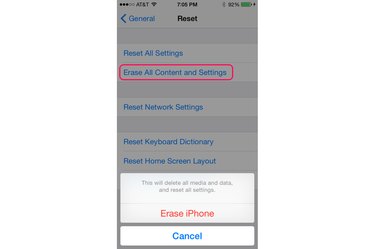
To restore your iPhone when you aren't near a computer with iTunes, open the Settings app, tap "General," "Reset" and then "Erase All Content and Settings." Press "Erase iPhone" to confirm. Your phone needs to boot successfully to use this method -- you can't reset an iPhone stuck in recovery mode without using iTunes. Choosing "Erase All Content and Settings" wipes your phone's memory, just like restoring in iTunes, allowing you to start from scratch or restore an iCloud backup. If you only have an iTunes backup, you'll have to wait until you reach your computer to set up the phone after the reset.
- Apple Support: ICloud: Remove Your Device From Find My iPhone
- Apple Support: Use iTunes to Restore Your iOS Device to Factory Settings
- Apple Support: IOS: Understanding 'Erase All Content and Settings'
- Apple Support: If You Can't Update or Restore Your iPhone, iPad, or iPod Touch
- Apple Support: ICloud: Restore or Set Up Your iOS Device From iCloud
- Apple: ICloud