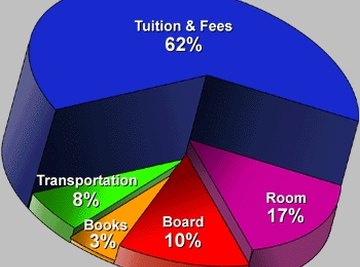

Creating a monthly budget circle graph is an effective way to plan spending each month and is rather easy to do on a computer. Using the Microsoft Excel program, a circle graph is easy to customize to one's business needs and is just a few clicks away.
- Computer
- Printer
- Microsoft Excel software
There are several versions of Microsoft Excel, so if a term seems different, find the closest related term. For instance "Pie Graph" may be called "Circle Graph" in some versions.
Be sure to correctly enter the data before creating the graph. If this is not done correctly, the graph will not accurately represent the data.
Input the budget data into the given Microsoft Excel cells vertically. Since you are making a circle graph, the data will add up to 100%, but not necessarily the number 100. The data should fill cells A1 and downward.
Click "Insert" at the top of the screen, move the mouse down to "Chart" and click.
Choose the "Pie" option for the type of graph. This is under Step 1 of the "Chart Wizard." Click "Next" at the bottom of the window.
Click the symbol to the right of the blank labeled "Data Range."
Drag the mouse across the data in the cells behind the window. To reenter the "Chart Wizard," click the symbol to the right of the blank again.
Click the "Series" Tab at the top of the window. Name Series One the first budget item.
Add series as needed to fit the budget items on the list. Press "Next" when finished.
Title your chart by filling in the "Chart Title" field.
Click "Finish" to create the circle graph.
Optimize the budget graph as needed by right-clicking it. When finished, print the graph.
Things You'll Need
Tips
Warnings
Tips
- There are several versions of Microsoft Excel, so if a term seems different, find the closest related term. For instance "Pie Graph" may be called "Circle Graph" in some versions.
Warnings
- Be sure to correctly enter the data before creating the graph. If this is not done correctly, the graph will not accurately represent the data.
About the Author
Scott Becker began writing professionally in 2008. His work has appeared on sites such as eHow and LIVESTRONG.COM. His interest and area of focus in his writing is science, particularly chemistry, biology and physics. Becker is pursuing a Bachelor of Science in microbiology, immunology and molecular genetics at the University of California-Los Angeles.
Photo Credits
http://www.wecdsb.on.ca/206/gr8/Pie_Graph.gif