When your iPhone no longer saves photos, the problem may be something as simple as a memory issue or as complex as data corruption. Regardless of the cause, there are a few things you can do to restore picture-saving functions. Freeing up memory and resetting your iPhone are the quickest solutions to address, but you may need to erase the content and settings on the iPhone if the simple fixes don't work.
Freeing Memory
Video of the Day
With online statistics portal Statista reporting about 1.4 million apps available through the Apple App Store in May 2015, there's a good chance you've tried some apps that didn't do quite what you wanted or that you no longer use. Delete unused apps to free up iPhone resources.
Video of the Day
Step 1
Touch and hold any icon on the iPhone. All the icons start to shake after two seconds.
Step 2

Press the X in the upper left corner of any app you want to remove.
Step 3
Touch Delete in the confirmation screen to remove the app from your iPhone. Repeat the process for all the apps you don't need on the phone. Press the Home button to stop the shaking.
Soft Reset
When removing apps and content doesn't resolve your problem, try a soft reset to clear and reload your iPhone's software.
Press and hold the Sleep/Wake button
on the top right edge of your phone and, at the same time, press and hold the Home button at the bottom center of your phone. Hold both for about five seconds until the screen goes dark, then release both buttons.
The Apple logo appears and your phone returns to its Home screen.
Check the iPhone's picture-saving capability. If it is not yet restored, proceed to the erase all content step.
Erase All Content and Settings
Step 1
Select Settings from your Home screen, touch General, and swipe to the bottom of the screen. Touch Reset.
Step 2
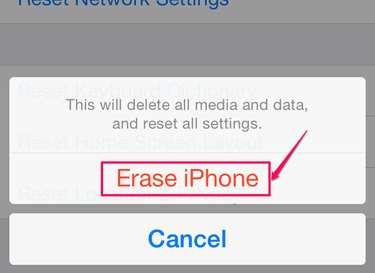
Select Erase All Content and Settings and then Erase iPhone. Once the erase is complete, your iPhone is returned to its factory default settings. You should now be able to take and store photos on your phone.