
The most frustrating thing since the advent of the Internet is not having Internet. The next most frustrating thing is having slow Internet. Thankfully, you can troubleshoot a slow Internet connection. Here are some ways to speed things up.
Know Your Speed
Video of the Day
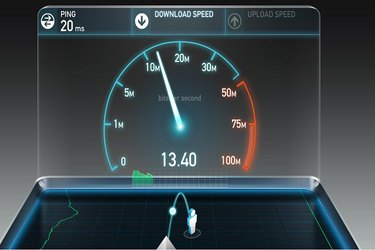
The first thing you'll want to know is this: How fast is your Internet, really? There are free online tools to find out. We recommend Speedtest and Ping-test. These sites will tell you the two parts of your overall Internet performance: your download and upload speeds. They only take a few moments to run and you don't need to download or install anything. You'll learn whether or not you're getting the speeds your service provider says you should. If you don't know what speeds you've signed up for, call your service provider. And then you'll know your real-world speeds when you do.
Tidy Up
No doubt, you have programs running in the background on your computer. These programs are pinging the Internet for a myriad of reasons, all the while taking up bandwidth that you need for more important things, like finding a hat for the Kentucky Derby or signing up for that one-way ticket to Mars. There are a number of ways to reduce the number of programs running in the background. Here are some tips for how to turn off programs that start up automatically with Windows. (You might be shocked by just how many programs there are.) This video shows you how to pare them down on a Mac.
You might also want to consider setting up your browser to block ads in their many nefarious forms, from popups to auto-playing video ads. You can do this through the installation of a browser extension that blocks ads. A good adblocker is Ad Block Plus. But there are many to choose from and each browser has a slightly different way to attach an extension. For example, you can view this video on how to attach an ad blocker extension to Google Chrome.
Beware of Clearing Your Cache
One note of caution: Your friends, family, and the occasional Internet article may recommend that you clear your temporary Internet files, cookies and cache in order to speed up your Internet. While clearing out these files may help your computer to run faster, it will actually make your Internet run slower. Your cache contains those parts of websites that remain static. These could be anything from graphics to HTML files to CSS style sheets. The reason your cache holds these items is that when you go to a website, especially one you visit regularly, your computer only needs to download those parts of the site that are new or different. The old parts of the site that haven't changed will be pulled from your computer's cache. The result is that you need less bandwidth to download the website and it will appear on your screen faster.
If you continually erase your cache, your computer will have to start from scratch each time you visit a website, even if it's a website you visit frequently. Do you have any idea how long it takes to load Cat Gifs? Do you want to wait around every single time for it to load anew? We didn't think so. This article is about improving Internet speeds, not computer speeds. If that's what you're after, go to this page for help.
Check Your Wireless Settings
Your Internet might be working fine... right up until it reaches your router, the device that broadcasts a WiFi signal through your home so you can do without wires. There are many things that could be affecting your wireless connection. Perhaps your wireless router is downstairs but you work upstairs where the connection is weak. You might need a WiFi booster or range extender. Or the fault might lie in your router's location in your home. If your router is in a rock-bound basement hidden in a lead-lined safe, that could be your problem right there.
Another possibility is that your router channel needs changing. Routers operate on different channels and some of those channels are shared by your neighbors, cluttering up the wireless frequencies. In other words, upstairs Fred and across-the-hall Amanda have routers that compete with your router. Since it's bad enough you have to share a laundry room with them, why would you want to share a router channel, too? The trick is to find a channel that no one else uses. There are tools to analyze your nearby WiFi channels to help you make a good choice. WiFi Analyzer is one.
Another quick fix, or at least a patch until you solve the problem, is to connect an Ethernet cable. Obviously, this only works if the router is nearby. But if it is, just walk right up to it, connect the cable from the router to your computer, and get ready for dramatically better performance.
Pony Up

Unfortunately, you get what you pay for. Sometimes your Internet is slow because the plan you've subscribed to offers very limited speeds. You might have something called a "starter package" or the "Best Value Plan." A film-making colleague spent an all-nighter uploading videos that took two-and-a-half hours each. The nail-biting experience -- they were due to the client the next morning -- left him a nervous wreck. He tried a lot of things to troubleshoot, but nothing helped until he called his Internet provider and discovered his plan only allowed for a 2 Mbps upload speed. For just $10/month more, he upgraded to 20 Mbps upload speeds. The transformation was as swift as it was dramatic. A video that would have taken him two-and-a-half hours to upload now only took a few minutes. Yes, he has three less lattes a month to pay for it all, but being able to download huge files at the drop of a hat made the trade worthwhile.
Replace Your Antique Router
It may simply be that you need a new router. This article covers some of the clues that signal it's time for a router replacement. These include sporadic access, connection drop offs, and router lights blinking error messages in distress. You also may have a router that's out of date. Does your router look like the one below? Modern routers have four or even more antenna, optimized for different kinds of signals.
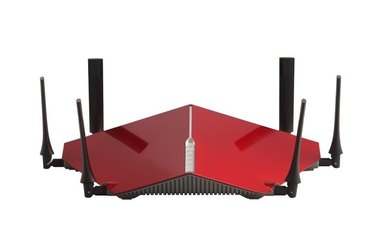
It looks fast standing still. If your router, by comparison, has just one or two antenna, that's not necessarily a problem, but it is a sign it's older and might not be as compatible with modern gear. It's entirely possible you're paying for great Internet speeds, but it's being funneled through a router that you bought after catching the premiere of "Crouching Tiger, Hidden Dragon." Great movie, old router.
Change ISPs
Just like playing a game of rock, paper, scissors, when choosing an Internet Service Provider, you want to choose wisely. If you've determined your current ISP isn't right for you, the next step involves some research. There are several types of providers, including cable, satellite and fiber optic. Each provider offers somewhat different plans. And consider the provider's reputation -- does it offer good customer support? Are there data caps? Hidden fees? By using DSL Reports you can see what people are saying about Internet Service Providers in your area. And Whitefence is a site that lets you easily compare different Internet plans.
Change Your DNS Server
Domain Name System (DNS) servers are the Internet's middlemen. You might never have heard of them -- and after all, why would you have -- but they connect you to everything else out there on the Internet. Though you type a URL (like "ehow.com") into your browser, your computer needs to know the numerical address of that site to take you there. Where does it get that info? From a DNS server. Some perform better than others. If your DNS server is mediocre, your speeds will reflect that. The trick is to find the fastest DNS server you can. There are tools to help you, like Namebench and DNS Benchmark. Once you know the best DNS servers, changing them can be a little tricky, and you might not want to fiddle with this unless you are confident bout your geekiness. Here are instructions for Windows 7 users, Windows 8 users and Windows 10 users. If you're an Apple user, you can find step-by-step instructions here.
On the Road

When you're traveling, you may be forced to work with slow Internet connections. Here are a few tips to get you through the trip:
- Use a wired connection whenever you can.
- Remember those background apps, the ones you removed from startup? Now's the time to close some more -- any ones that you didn't shut down earlier.
- If you haven't taken the advice about ad-blocking extensions yet, here's a second chance. Ads will absorb whatever little bandwidth you have.
- Try the Opera browser. It has a turbo mode for faster speeds that works by compressing pages and shaving pixels.
- Finally, work offline whenever you can. Many online apps have offline modes. Do your work offline, and then connect briefly to send that email, cloud that document, or log in to that account.
Magnetic Induction (Don't Believe It.)
Some sites claim that this is by far the single most important thing you can do for faster Internet (Don't believe it). They say that it is guaranteed to triple your Internet speeds (It won't).
To be clear: This is not real.

But this young master of satire is pretty convincing. As he explains, all you need are two batteries, an Ethernet cable, and some electrical tape.
If you're sadistic, feel free to send this video to friends and family after you've fixed your Internet and tell them this is how you did it. Urge them to do it as well. Or, perhaps just send them a cat gif.