When you have more than several computers and users who want to share files and resources, whether in your home or in a small office, you can convert a computer into a server. Building a server out of a computer will allow users to access files whichever computer they use to access them. An example of the resources that can be shared is a printer and shared folders such as photos and documents. Here's how to convert a computer into a server.
Things You'll Need
Video of the Day
- Computer
- Extra hard drive (optional)
- Network card (optional)
- Network router (preferably wireless)
Video of the Day
Step 1
Prepare your computer. Clean up the computer with unnecessary files to save on space. If your computer is really old, install the latest operating software so that it is compatible with the rest of the computers that will share its resources. For this example, we are installing Windows XP.
Step 2
Check the hard drive space or capacity if you have enough. You can do away with 256MB sized old computer, but you may want to think about adding more disk space for future needs. You can easily buy extra internal or external hard drives to bump up your disk space to a capacity that you would desire. Try purchasing a 10GB extra disk drive then insert it in computer or connect via a serial port or USB hub it if it is external drive. To install the hard drive driver on XP, let the hardware wizard run you through the options. You can install the driver with the installation CD software that your hard drive came with. Follow the options during installation. ,
Step 3
Check your computer if the network card (ethernet card) is functioning properly. if it does not, you would need to install a NIC or Network Interface Card. Some old computers have 10 megabit cards, but if you want to have high network performance and better connectivity through your LAN (Local Area Network) then you would need to upgrade your NIC by installing a 100 megabit or 10 gigabit NIC. Install your network card driver using the installation CD that came with it then follow the installation wizard.
Step 4
Get a network router. Connect this router to your high speed connection. The most common ones to use are Netgear, Linksys or DLink routers. Choose a wireless router so that if you have wireless users they can connect easily (plus this will save you on trying to connect cables to the router all over the place). Set up your network connections. Click on "Start," "Control Panel and "Network and Internet Connections." Pick a task from the options listed or pick a control panel icon, in this case "Network Connections." If you are set up to pick up the IP Address of your computer automatically, one you have installed your NIC in Step 4 and rebooted, it will pick up the connections automatically whether plugs in using a LAN or network cable or using wireless card.
Step 5
Rename your computer. Name it so that it can easily be identifiable in your network. You can either name it simply "SERVER" to be easily recognized, but it is all up to you how you want to name your server. To name your server if you are using Windows XP, you can right-click on "My Computer" then click on "Properties." Go to "Computer Name" tab then click on "Change." Other Windows operating systems or versions would have this feature located somewhere else. Read the owner's manual that your computer came with it.
Step 6
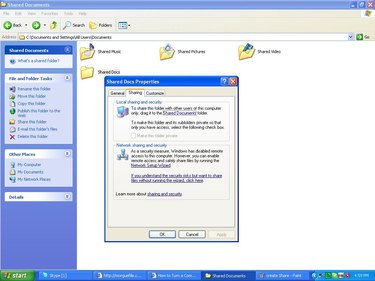
Create a shared folder by going to "My Computer" and "C:\Documents and Settings\All Users\Documents." Create a new folder by right-clicking on the screen, then click on "New Folder." Name the new folder "Shared Files" or anything that can easily be identifiable. Take note that on Windows XP, any folder that you create and then dragged into the "Shared Documents" folder will be automatically shared by everyone. You can restrict certain folders by dragging the folder out of the "Shared Documents" folder, then right-clicking on the file folder, clicking on "Properties," then the "Sharing" tab and finally "Make this Folder Private."
Step 7
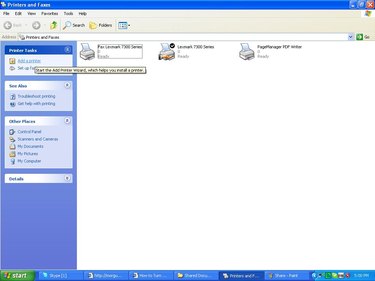
Create a shared resource by adding a printer or fax to use. Go to "Start." Click on "Printers and Faxes" and "Add a Printer," then let the installation wizard that came with the printer or fax guide you. Name your printer or fax (for example, "Shared Printer"). Then once the printer is installed, set it up so that you can share it by right-clicking on the "Shared Printer," then on "Properties," "Sharing" tab and finally on "Share this printer."
Step 8
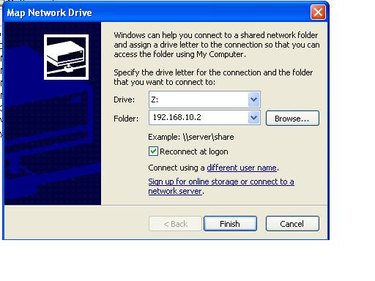
Connect any computer to your server. Go to each computer and ensure they are connected on the same router. Then go to "Start" and "Run," type in "EXPLORER," then on the menu click on "Tools" and "Map Network Drive." A window will pop open where you will assign a "Drive" letter and a "Folder." Choose any driver letter, for example "G" to denote "Group" drive or "S" to denote "Shared Drive," then type in the IP address of the server. To do this, go to the server, then go to "Start" and "Run," type in "CMD" then type in "IPCONFIG." This will display your server's IP address. Type the IP address on the "Folder" field on the computer. You can also try if the computer will automatically find it by choosing the drive letter then clicking on the "Browse" button on the "Folder" field.
Step 9
Start using the shared resources by going to the drive letter that has been assigned on your computer.