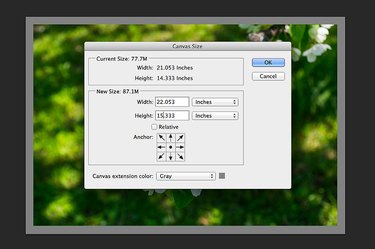
Just as in oil painting, the canvas in Adobe Photoshop refers to the entire area you have to work with. Photos, shapes and other objects can be smaller than the canvas, but can never go beyond the canvas borders. If the canvas is too big or too small for the project you're working on, you can adjust the canvas size from the Image menu in Photoshop CC. Changing the canvas size doesn't change the size of anything displayed on the canvas, but decreasing the canvas size may crop some of the images inside it.
Step 1
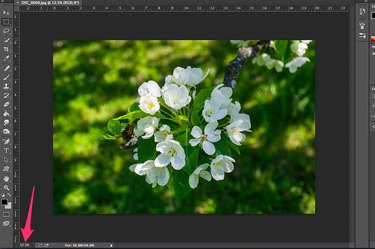
Open an image or project in Photoshop. Click the "Zoom" menu below the canvas and reduce the displayed percentage so you can see some space around the canvas. Select "Canvas Size" from the Image menu.
Video of the Day
Step 2
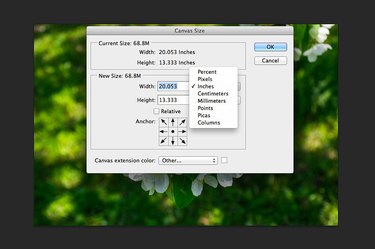
Click either the "Width" or "Height" pop-up menu to change the unit of measurement if desired. The current dimensions are listed at the top of the Canvas Size window as well as in the text fields below. Select "Percent" from the pop-up menu if you want to increase or decrease the canvas size by a percentage instead of a fixed unit of measurement.
Step 3
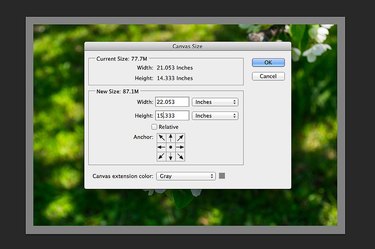
Change the numbers in the "Height" and "Width" text fields to whatever number you want for the new canvas size. To add a half-inch border around an image, increase both numbers by one inch. If you're using the Percentage option, and want to increase the canvas size by 20 percent, enter "120" in both text fields. If you're increasing the canvas size, a border appears around the image. Click the "Canvas Extension Color" menu to change the border color.
Step 4
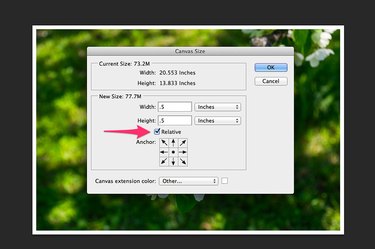
Click the "Relative" check box if you want to use relative values when specifying a new canvas size. For example, if you want to increase the canvas width by 2 inches, type "2" in the Width field. To decrease the width by 2 inches, type "-2" in the text field. When using percentages, "10" or "-10" increases or decreases the canvas size by 10 percent.
Step 5
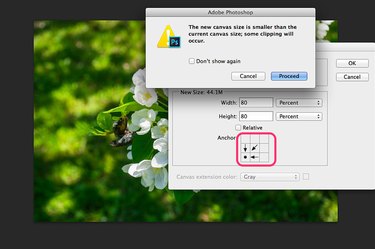
Click any arrow in the Anchor section to specify where you want the image anchored in the new canvas. If you're reducing the canvas size, moving the anchor is a good way to ensure important parts of the image remain visible. A dialog box opens after you click "OK," warning you if the new canvas is too small to accommodate the current image.
Video of the Day