Operating systems such as Windows 7, 8 and 8.1 allow you to play sounds while navigating through files and folders, or when performing certain actions such as opening or closing applications. Use the Sound configurations panel to manually select the actions for which you want to hear sounds when interacting with your mouse.
Step 1
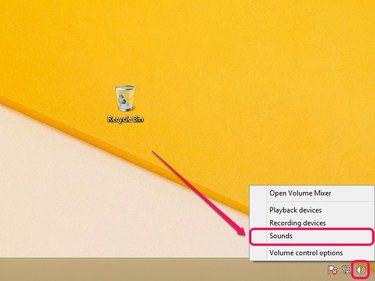
Right-click the Volume icon on the system tray, and then select Sounds.
Video of the Day
Step 2
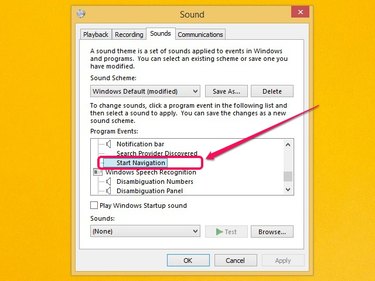
Click the Sounds tab. The Program Events section lists various events that can play sounds while interacting with them using your mouse.
- Start Navigation - Opening files and folders using File Explorer or Windows Explorer
- Close Program - Closing applications
- Maximize - Maximizing applications
- Minimize - Minimizing applications
- Menu Commands - Selecting items on context menus.
- Open Program - Opening applications
- Restore Up - Restore up application after minimizing
- Restore Down - Restore down application to normal size
- Select - Selecting items on desktop
For example, to play clicking sounds while navigating through files and folders via File Explorer (Windows Explorer on Windows 7), select Start Navigation.
Step 3
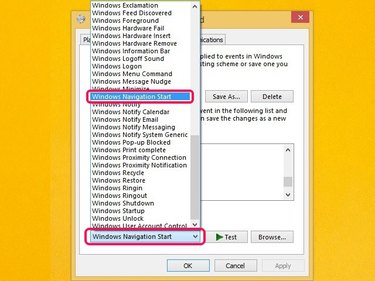
Open the Sounds menu, and then select Windows Navigation Start from the list of available sounds.
Step 4
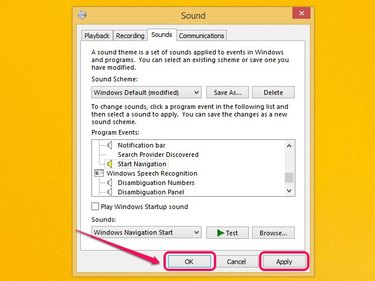
Click Apply, and then click OK to save the changes.
Video of the Day