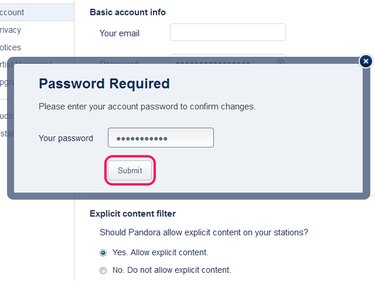
Pandora's account settings screen looks a little different than those in most apps and websites. Rather than featuring a clearly labeled "Change Password" button, it simply has a field to enter a password. At first glance, you might think this field serves to log in to your account, but in fact it's used to choose a new password. After saving your new password, Pandora asks for your old one as verification.
Change Your Password in the Pandora App
Video of the Day
Step 1: Open Your Settings
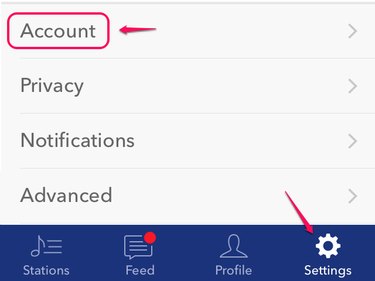
Open the Pandora Radio app for iOS or Android and back out of the currently playing station, if you have one open. Tap Settings and then Account to open your account settings.
Video of the Day
Step 2: Enter a New Password
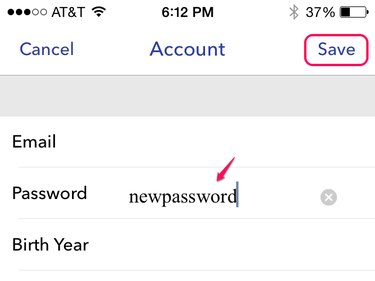
Enter a new password in the Password field and tap Save. You don't need to change anything else on the page, unless you want to alter other account details.
Step 3: Verify Your Old Password
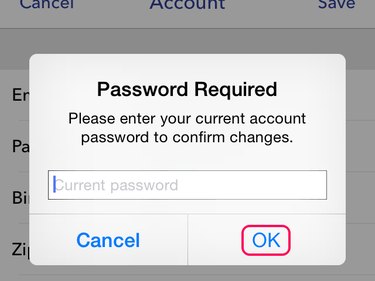
Enter your old Pandora password and tap OK to confirm.
Change Your Password on the Pandora Website
Step 1: Open Your Settings
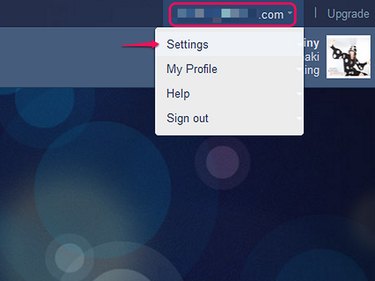
Log in to Pandora in your computer's Web browser. Click your email address in the corner of the page to open a menu, and choose Settings.
Step 2: Enter a New Password
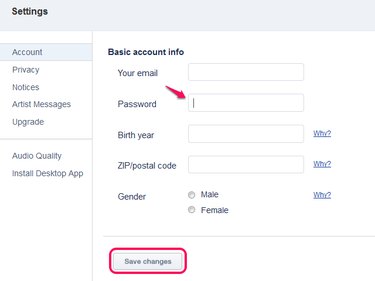
Enter a new password on the Password line of the Account tab and click Save Changes.
Step 3: Verify Your Old Password
Fill in your old password and click Submit to confirm the change.