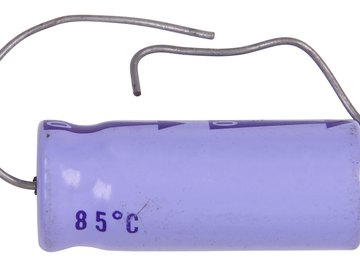

Capacitors are energy storage devices that have voltage ratings. High-voltage capacitors typically range from 25 volts (found in common home electronics) to thousands of volts (in specialized equipment used in communications.) The higher the voltage rating of a capacitor, the more charge it can hold. To charge a capacitor to its fullest potential, a power supply is needed that can deliver the amount of maximum voltage the capacitor is rated. Regardless of the voltage rating of a capacitor, the charging process is the same -- connect the leads from a power supply to the leads of a capacitor.
- 25-volt capacitor
- DC power supply rated 25 volts or higher
- Power supply leads with alligator clip ends
A capacitor rated at 100 volts or higher can be charged with a 25-volt power supply; however, the capacitor will not be charged to its full potential. Specialized power supplies are used to charge capacitors rated in the hundreds to thousands of volts.
Capacitors can store enough charge to yield a severe electrical shock. Never touch a capacitor by both leads at the same time.
Find the voltage rating of the capacitor. On large capacitors, it is printed clearly on the body of the capacitor, such as "25 V," for example. Smaller capacitors may or may not have the voltage rating printed on its body. If no voltage is indicated, check with the manufacturer for the capacitor's specifications.
Observe the polarity of the capacitor. High voltage capacitors typically have a thick line or arrow with a minus (-) sign printed on it indicating the cathode (negative) lead of the capacitor.
Insert the two leads with alligator clips into the positive and negative lead input jacks of a 25-plus volt power supply. Clip the negative lead of the power supply to the negative (cathode) lead of the capacitor. Clip the positive lead of the power supply to the remaining lead of the capacitor.
Turn the voltage knob of the power supply to its lowest setting before turning the power supply on.
Turn on the power supply, and slowly increase the voltage no higher than 25 volts. Increasing the voltage delivered to the capacitor beyond its rating will damage the capacitor and possibly cause an explosion. The charging of the capacitor is practically instantaneous.
Disconnect the leads and turn off the power supply. The capacitor is now fully charged and ready for use.
Things You'll Need
Tips
Warnings
References
- "Teach Yourself Electricity And Electronics"; Stan Gibilisco; 1997
- Practical Coilgun Design: Capacitors; Barry Hansen; 2008
Tips
- A capacitor rated at 100 volts or higher can be charged with a 25-volt power supply; however, the capacitor will not be charged to its full potential. Specialized power supplies are used to charge capacitors rated in the hundreds to thousands of volts.
Warnings
- Capacitors can store enough charge to yield a severe electrical shock. Never touch a capacitor by both leads at the same time.
About the Author
Since 1999, Timothy Boyer has worked as a freelance writer. His career began as a science columnist with "The Northwest Explorer" and as a science writer with McGraw-Hill publishing's Power Web Series of educational articles. Boyer has a Ph.D. in molecular and cellular biology from the University of Arizona.
Photo Credits
Hemera Technologies/PhotoObjects.net/Getty Images