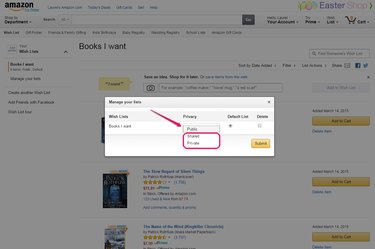
The three different privacy options for an Amazon wish list.
Image Credit:
Image courtesy of Amazon.
The first wish list you create on Amazon is, by default, public -- anyone can see it, whether they know you or not, and it will appear in search results. Using Amazon's list management tool, you can change it, and any other wish list you create, to either shared or private. A shared wish list is not searchable, but you can give the address to others so they can see it; a private wish list, on the other hand, is truly private and visible only to you.
Step 1
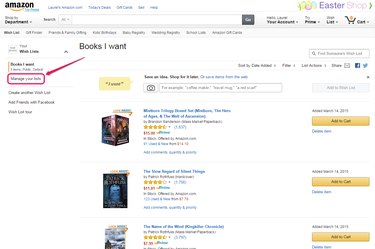
The wish list page on Amazon.
Image Credit:
Image courtesy of Amazon.
Open your wish list and click Manage Your Lists.
Video of the Day
Step 2
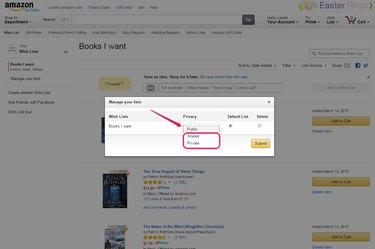
Changing the privacy settings for a wish list.
Image Credit:
Image courtesy of Amazon.
Select either Shared or Private from the drop-down menu by the name of the list, depending on your preference.
Step 3
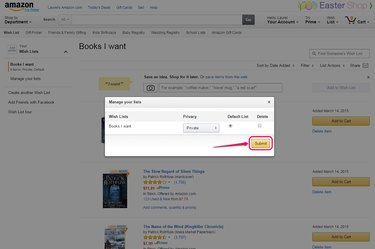
Saving the changes.
Image Credit:
Image courtesy of Amazon.
Click Submit to save your changes.
Video of the Day
references