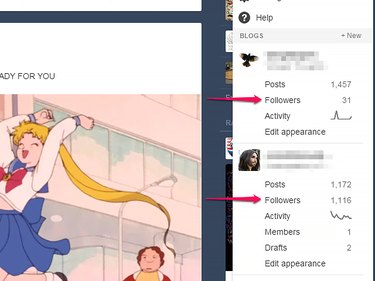
The primary way to check who reads your Tumblr blog is to use the built-in list of followers. This list is available for each blog you own, whether it's a primary or a secondary one; you can reach it through the Account menu on your dashboard.
One thing to keep in mind is that, because of how Tumblr works, the list of followers includes only your readers who have a Tumblr account. To check who views your blog's main page, you can use a visitor tracking system such as Google Analytics; any such system will, however, have the opposite issue -- it won't track visits by followers who view your blog through the Tumblr dashboard.
Video of the Day
Video of the Day
Step 1
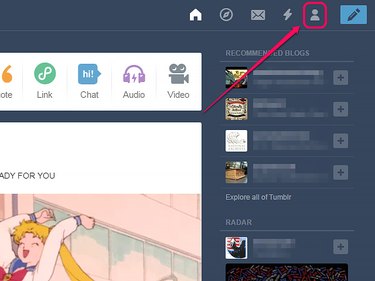
Click the person icon to open the Account menu. If you have only one blog, the menu entry you need is immediately visible, so you can skip the next step.
Step 2
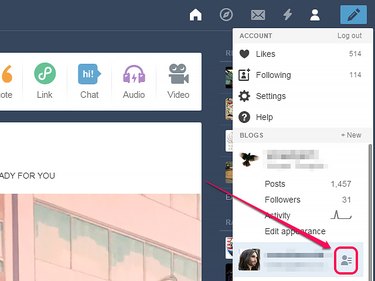
Hover over the name of the blog for which you want to display followers and then click the person icon that appears to unfold additional information for it.
Step 3
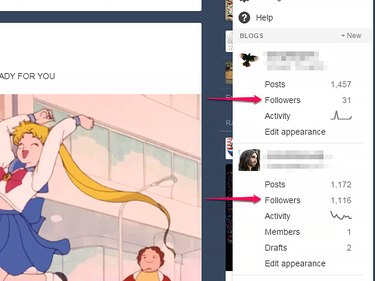
Click Followers to see the list of followers for that blog.
Step 4
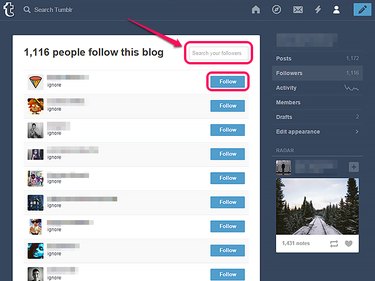
Type a Tumblr username in the search field and press Enter to check whether that person is following you. Even though usernames are not case-sensitive, you must type the username entirely in lowercase for Tumblr to recognize it. The username you check must belong to a primary blog, since only primary blogs can follow -- the usernames for secondary blogs won't be recognized.
Click the Follow button corresponding to an entry in the list to follow that blog. There is no way to unfollow someone from within the list of followers.
Step 5
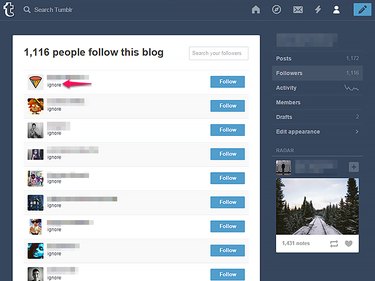
Click the Ignore link for a blog to ignore that blog. Doing so means you will no longer receive any messages from the owner of that blog, nor see any dashboard notifications or activity generated by that person liking or reblogging your posts.