Things You'll Need
Tin ceiling tiles
Spray metal primer paint
Red latex or acrylic paint (or another color if you want to emphasize another color)
Faux glaze (I like Home Depot glaze)
Black or dark brown latex paint
Gold acrylic paint
paint brush
Old rag or cheesecloth
Clear acrylic sealer

It's easy to order any tin ceiling tiles that you like and paint and distress them to look like they are really old. There are several sites on the internet with 100's of tile designs to choose from.
Step 1
Lay your tile on some old paper or drop cloth and spray with the metal primer. It might be gray, but that's fine. Let dry. Next spray with the red paint or whatever color you want to show through on your tiles. Cover completely. Let dry.
Video of the Day
Step 2
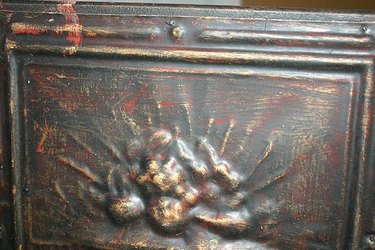
Next mix one part glaze, one part black or dark brown paint and 1 part water. You will only need about a 1/2 cup of each. Brush this on the red color randomly. You can leave some red showing or cover as much as you want. Use the old rag or cheese cloth to dab and spread the glaze mixture around, getting more in the cracks and crevices. The more uneven the black is, the better it will look. Let dry and then you might want to add more black. If you get to much black, dab some red back in. You can't mess this up, so just have fun.
Step 3
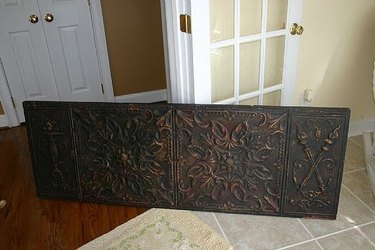
When you have as much red and black showing as you like, you can move on to the gold accents. Use metallic gold paint. You can use the kind in the little bottles. Using a small brush or sponge, LIGHTLY brush the gold on the "high" spots on the tile. You can use the old rag again and dab the gold off as you put it on, before it has time to dry, to get a look of the gold has worn off. When you are happy with the look, lightly spray with a clear acrylic sealer.
Tip
You can't mess this up. Just keep playing with your paint and tiles until you achieve the look you want. You can add touches of any other colors that you want to bring out some of your room colors. Do this before you put the gold on.
Warning
You may have so much fun doing this that you will want to distress more things in your house.
Video of the Day