There are a few ways to create an umlaut when typing German text in Microsoft Word. Use Windows Ctrl and Alt key commands to automatically create or insert a letter with an umlaut, or insert an umlauted letter from Word's Symbol tool or the Windows Character Map.
Use a Ctrl Key Command
Some Ctrl key combinations tell Word that you want to format letters in a specific way. When you then type the letter, Word applies the formatting to it.
Video of the Day
Video of the Day
To create a ü, hold down the Ctrl, Shift and : keys simultaneously. Release the keys and type the letter u. Word adds an umlaut to the letter when it inserts it. To create an ö, use the same command, but type the letter o instead. The same command also applies when creating an ä.
Use an Alt Keyboard Shortcut
Alternately use Alt code shortcuts to make letters with umlauts, by holding down the Alt key and then typing a numeric code in the number keypad on the keyboard. For example, to type an ö, hold down the Alt key and type 148 or 0246 on the keypad. Release the Alt key and Word inserts the ö.
Each lowercase and uppercase letter with an umlaut has two shortcut codes. One has three digits; the other has four. You can use either code — if one doesn't work, try the other.
- Ä = Alt-142 (or 0196)
- ä = Alt-132 (or 0228)
- Ö = Alt-153 (or 0214)
- ö = Alt-148 (or 0246)
- Ü = Alt-154 (or 0220)
- ü = Alt-129 (or 0252)
These codes don't work with the number line on a keyboard; you have to use the keypad. If you're using a keyboard without a pad, you may be able to use a workaround if the keyboard has an Fn key and numbers printed on letters. Hold down the Fn and Alt keys simultaneously and use the numbers over letters -- not the number line -- to type the code. If this doesn't work, create the umlaut from the Symbol tool or Character Map.
Use the Symbol Tool
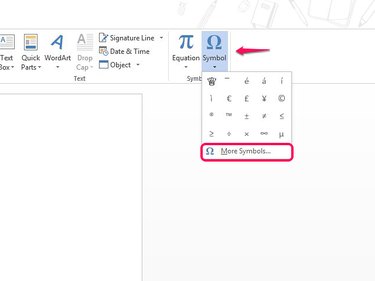
Open the Insert tab and select Symbol and then More Symbols.
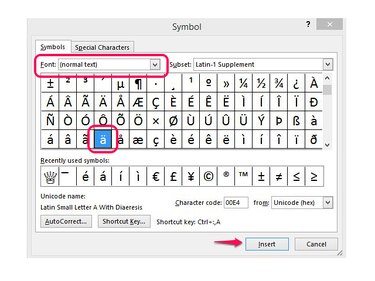
Select Normal Text in the Font box to insert letters in the font you're using in the document. Locate the letter with the umlaut and select it. Select Insert.
Use the Windows Character Map
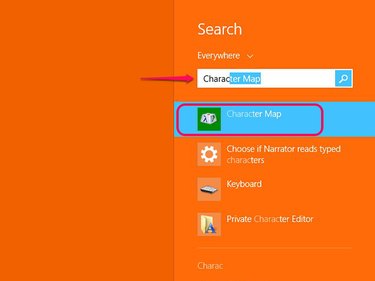
Type Character Map in the Windows 8 Home screen or the search box in the Windows 7 Start menu. Open the program from the search results.
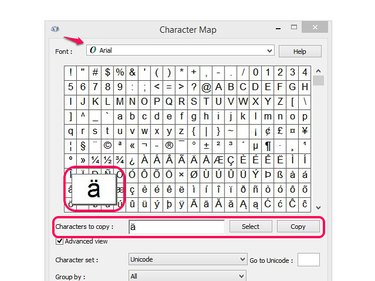
Set the font you want to use in the Font box. Find the letter with an umlaut and select it. It will pop out on the list. Use Select to add the letter to the Characters to Copy box and select Copy. Paste the letter in the document.